


Deploy with Confidence: Strategies to Maximize Success (on Posit Connect) (Ryszard Szymański)
Deploy with Confidence: Strategies to Minimize Failure and Maximize Success (on Posit Connect) Speaker(s): Ryszard Szymański Abstract: Release day has arrived - you’re eager to share the latest version of your app with users. You deploy it, ready to celebrate… Then everything breaks. The app won’t load, and the errors make no sense. Despite all your efforts - testing locally, verifying in staging - production still surprises you. Deployments are tricky, full of hidden challenges that can derail even the best preparations. But with the right strategies, you can reduce risk and increase the likelihood of a successful release In this talk, we’ll explore deployment techniques such as blue/green deployments and feature flags, showing how they can be applied when working with Posit Connect. You’ll also learn what to do when the unexpected happens. Example - https://gist.github.com/rszymanski/65b140a2a2f03369d26a9fe86d01602e Package - https://github.com/szymanskir/featureflag Links - https://gist.github.com/rszymanski/4b17170a9630dd8e9af191d7e5d6b2c7 posit::conf(2025) Subscribe to posit::conf updates: https://posit.co/about/subscription-management/
image: thumbnail.jpg
Transcript#
This transcript was generated automatically and may contain errors.
One day I was working on a new feature. I was adding a UI badge indicating the status of content that users were creating in the app. The status value was based on a complex mix of parameters. So, I used all of the best practices that I know. I wrote my tests, I asked for code review, I verified my logic in a staging environment. I was ready to release the new feature to our end users.
And this is what I saw in production. An error. And so did our users. Turns out, production data had edge cases I did not anticipate. Reality was messier than staging. And that's the point. Production is full of variables we cannot always predict.
Now, imagine a different reality. One where we can see things go wrong before our users ever notice. During this talk, I'd like to share deployment strategies that help us get there. Starting with blue-green deployments.
And that's the point. Production is full of variables we cannot always predict.
Blue-green deployments
So, usually, you host your app on some kind of a server. While your users access it through a client. For example, a browser in their laptops. And the idea behind blue-green deployments is that we have two separate app instances. One called blue, and the other called green. And in the beginning, your users access the app through the blue instance.
When you're ready to release a new version, you deploy it to the green instance. You verify if everything's working as expected there. And if it does, you switch the traffic. So now your users access the new version, but this time through the green instance.
But that was the optimistic scenario where everything worked as expected. What if something goes wrong on the green instance? Well, in these cases, you find yourself in a much more comfortable situation. Where you can calmly investigate what's wrong in the green instance. While your end users continue to use the stable version of your app on the blue instance.
Let's see how we can use this strategy on Posit Connect. So the way we can reverse traffic is by using vanity URLs. And I'll explain what those are in a bit. And separate app instances can be achieved by having separate content items.
So usually, when you deploy something on Posit Connect, the URL would look sort of like this. So it's your connect URL slash content slash the GUID of your app. Posit Connect allows you to configure a user-friendly URL called a vanity URL. Where you can configure the exact path where your app is available. You can configure a vanity URL using the content settings in the Posit Connect UI. And separate app instances can be achieved by having separate content items. So you can create two separate deployments on Posit Connect and call one blue and the other green.
Let's see how an example blue-green deployment could look like on Posit Connect. So let's say our users are accessing the app through the my underscore URL vanity URL. Which is initially configured for the blue content item. Now we deploy the new version to the green content item. And once we confirmed everything's working as expected, we reconfigure the same vanity URL. But this time for the green content item.
You can automate this process using the connect API package in less than 40 lines of code. Here's a QR code where you can find an example script. Of course, you can perform this manually. But if you're looking for a fully automated script, I can imagine one where you can run a test suite. After you deploy the new version to the green content item. And after your tests pass, you would reconfigure the vanity URL and switch the traffic.
Feature flags
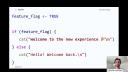
Now let's move on to feature flags. So feature flags are also often called feature toggles or feature switches. They're essentially a mechanism for turning features on and off in your application. It's just a clever if statement.
So a feature flag can be just this simple logical value. And depending on whether it's true or false, we would enable or disable features. So in this case, if that feature flag is enabled, we would welcome the users to the new experience. But if it's disabled, we would welcome them back to the good and old experience.
We can apply the same idea to applications. So let's say we have an app where we have two different tabs with two different features. We can hide one of the tabs behind the feature flag. And this is how it could look like. So based on the feature flag value, we could insert a tab containing our feature or not.
Of course, there are other types of feature flags. These don't have to be simple logical values. But you can enable a feature for specific users or groups based on an environment variable or at a specific time.
Let's have a look at an example of how we can use Posit Connect. Let's get back to our example of an app with two different tabs with two different features. And in the Posit Connect UI, you can find the People tab where you can find information on users and groups. And the reason I mention this is Posit Connect provides you with information about the logged in user when accessing your app. And that information includes their username and the groups to which they belong to. And in case of Shiny, that information is available through the session parameter of the server function.
Let's create a group called FeatureBGroup. And what we want to do here is to only show the FeatureB tab for the members of that group. So we can use the FeatureFlag package, which I have developed, which allows you to create a ConnectGroupFeatureFlag, where you specify the groups for which this flag should be enabled. And here we'll specify the FeatureBGroup we just created. Now, in our code, we can check if that flag is enabled. And if it is, we would insert the tab containing FeatureB.
So what we just achieved here is a situation where different users accessing the same app might see a slightly different UI. Members of the FeatureBGroup would see the FeatureB tab, while others who do not belong to that group would only see the FeatureA tab.
Imagine if we had applied this idea to the UI badges. What could have happened there is we could have hidden the UI badges behind the FeatureFlag that's only enabled for developers. And that way, in production, only developers would see the error, while users would be able to continue using the app, but without the UI badges.
What could have happened there is we could have hidden the UI badges behind the FeatureFlag that's only enabled for developers. And that way, in production, only developers would see the error, while users would be able to continue using the app, but without the UI badges.
But how do we deploy using FeatureFlags? So in the beginning, let's say FeatureB is only accessible to the members of the FeatureBGroup. So everyone else does not have access to it. If we release it to everyone, we can change the FeatureFlag value to true. And that way, we will enable this feature to everyone that's accessing our app.
Let's have a look at another example. So the FeatureFlag package also allows you to create FeatureFlags that are connected to environment variables. So here we're creating one that's connected to the FeatureB environment variable. By default, if that environment variable is not configured, the flag will be disabled. But if we configure it and set it to true, it will now be enabled.
We can combine that with the ability to configure environment variables in Posit Connect UI and perform our deployments this way. So let's say in the beginning, our content doesn't have this environment variable configured. So FeatureB is not accessible to anyone. We can configure this environment variable and that way make FeatureB accessible to all of our users. So what's happening here is the deployment is not... It does not mean we're deploying new source code, but we're just changing an environment variable value and releasing our new features that way.
Handling failed releases
Okay, but what if we use blue-green deployments or FeatureFlags and their release still failed? So while those strategies do help you minimize some risks, they're not silver bullets. So usually we have at least two options. One of them is to fix things forward. So the idea here is you see an issue, you fix it, you release a new version containing the fix. And that's useful in scenarios where the issue is small, does not disrupt users, and you exactly know how to fix it quickly. A good example of that is a typo in the UI.
Or the other option is to roll back. And that means going back to a previous stable version of your app. And that's useful in cases where the issue prevents your users from working in the app, and you really don't know what's going on and you need time to investigate.
Thankfully, you can easily perform rollbacks in the Posit Connect UI. So if you navigate in the top right corner to the source versions option, you will be listed all of the bundle versions that have been used for this specific content item. And in there, you can pick a previous bundle and click the reactivate button, and that way bring back a previous version of your code.
In the end, deployments don't have to be scary. By adopting the right strategies, like blue-green deployments or feature flags, and by knowing how to fix things forward or rollback quickly, we gain control. Shipping to production should feel safe. And with the right approach, it can be.
Thank you. That will be all from me. Here's my email, and you can also find me on LinkedIn. And if you want to check out any of the materials I shared in this presentation, you can find them compiled using this QR code. Also, later on, we have a Q&A. So I'll see you there. Remember to put your questions on Slido. And I'm also on Discord, and we can chat there as well. Thank you.