


Package Management for Data Scientists - posit::conf(2023)
Presented by Tyler Finethy In my talk, "Package Management for Data Scientists," we will discuss software dependencies for R and Python and the common issues faced during package installations. I will begin with an overview of package management, highlighting its crucial role in data science. We'll then focus on practical strategies to prevent dependency errors and address effective troubleshooting when these problems occur. Lastly, we will look towards the future, discussing potential package management improvements, focusing on reproducibility and accessibility for those new to the field. Presented at Posit Conference, between Sept 19-20 2023, Learn more at posit.co/conference. -------------------------- Talk Track: Managing packages. Session Code: TALK-1081
image: thumbnail.jpg
Transcript#
This transcript was generated automatically and may contain errors.
Hey everyone. I'm excited to go last because I have a slide on motivation, but I think the last three talks really kind of drove the point home. So thanks for coming to my talk, Package Management for Data Scientists. Just as an introduction, my name is Tyler Finethy. I'm an engineering manager at posit working on the Package Manager product. I'm also a member of the R Consortium Working Group for Repositories, and I have about a decade of software engineering experience. I also started in data science running into a lot of the problems that were discussed today.
So as an overview, I'll go through some motivation and scope. We'll talk software package basics. I'll go through a couple challenges, solutions, and ways to prevent those challenges from appearing in the first place. Finally, we'll end with some key takeaways.
So if you've ever lost your mind installing package dependencies in a new environment and things blow up, running an old script and you get a little frustrated, hearing it works on my machine by maybe a co-worker and then you can't get it running, this talk's probably for you.
So just for scope and focus, these are going to be language agnostic challenges and solutions, but the examples will be in R and Python. Challenges are typically not unique to one language, but the good thing is that means that neither are the solutions or the approaches we can take to those challenges. And finally, I'm just going to use package library dependency interchangeably, because once you try to figure out what is what in different languages, it gets a little chaotic.
What is a package?
So what is a package? The way I kind of define a package is it's an encapsulated piece of code or software. These are shared or installed to enhance or extend existing functionality. So in R, you use install.packages. In Python, you might use pip install or conda or pipenv. You have a lot more options. And then some examples, we use ggplot2 to create graphs and plots and requests to make HTTP requests.
So to make sure everyone's on the same page, we install a package using install.packages. We use a library command in R to import a package, and then we can use that package in our code to run the functions, in this case, creating a scatterplot. Same thing in Python, we install a package. This happens at the command line in Python using pip. We can import that package, and then we can use it in our code.
Conflicting versions
So the first challenge that I want to talk about is the conflicting versions challenge. We talked about this a little bit with snapshots, but packages generally use other packages. So this is an example of a dependency tree. It's a little dated, but the concepts are still there. Say we want to install some package. We call that a direct dependency. That package, just like we want to enhance our software, it wants to enhance itself and not have to do all the little things. So it has indirect dependencies. The thing that we really want to focus on here is packages that have many lines going to them. So those are packages with a number of reverse dependencies like we see down here in the bottom.
So with that information, we can look at a conflicting versions example. So say we have package A, and that relies on some version of Rcpp, call it 1.0.6. This is all good and dandy until we want package B, which requires Rcpp 1.0.7. So that probably won't work. But what should we do here? We can say we'll just always use Rcpp 1.0.6 for package A, and we'll use 1.0.7 for package B. A lot of languages won't actually allow that, but even if they did, it would be pretty hard to manage. We could potentially upgrade package A, but that will depend if the author has actually upgraded package A in GitHub or on CRAN. And then we could try downgrading package B, but you run into the same problem. That author might not have a version that works with Rcpp 1.0.6.
So this fictitious example comes from Stack Overflow. I found this annotation hub installation of Rcpp 1.0.6 is already loaded, but you know you need 1.0.7. So looking at the solutions from Stack Overflow, first one user recommended using renv. That ended up working for the person who ran into the issue, but at the end of the day that was just downgrading annotation hub. The next user said, update all of the installed packages, delete all of your other files, create a new environment, and that solves your problem. I don't know if you want to do that every single time. And then same thing, upgrade R, which is basically a new environment, and then everything should work for you again when you install all your packages.
So we should know how to solve these things, but we should learn to prevent them in the first place. And I have renv on this slide, but maybe it should say slushy. We should use tools to create reproducible environments. So we have renv lock, we have requirements.txt in Python, and then we should use snapshots for package installation. So mini-cran is one R package that you can use to grab subsets of cran. Bandersnatch is one in Python, and then it was mentioned a couple times previously, but we also have posit public package manager. If you haven't seen that before, this is what the view kind of looks like as you're selecting a snapshot that you want to always install packages from. This works really well on the R ecosystem, because those packages on any given date are more likely to be compatible with one another, and then it works really well in Python, because if a package is randomly deleted from PyPI, which happens sometimes when authors get mad, then you also get those.
System dependencies
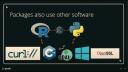
So the next challenge I want to talk about are system dependencies. Like packages also use other packages, packages also use other software. So you can have R that relies on Python using reticulate, but you can have R and Python that rely on a bunch of different pieces of software. So your Python code might only work on Windows, your R code might only work with a specific version of C++, Python might require OpenSSL, whatever it is, and so this can make it pretty hard to move these things around.
So as an example again, say we want to install the cryptography package in Python. So we run pip install cryptography, and then we get some esoteric error that we don't have something installed. So what should we do now? We can google how do you install GCC and then try this command again and hope it works. We can try to find a binary that's pre-installed and maybe that will solve our problem. And this again comes from Stack Overflow, I actually found a ton of these. And then looking at the solutions, if you're on Windows, you'll need to make sure you have OpenSSL installed. For Debian or Ubuntu, you need to run some other command. And there were more solutions for Mac OS, RHEL, Fedora, Raspberry Pi, etc.
So again, we can prevent this from happening in the first place. We can use tools to easily manage and recreate environments. We can use Conda, Docker, PipM, even Workbench works for this. We can use pre-compiled binaries when possible. So PyPI will serve wheels which differ by package, so some packages will have pre-compiled wheels and other packages won't. CRAN generally serves R packages built for Windows and Mac OS. R-Universe also serves packages built for Windows and Mac OS. Public Package Manager adds some Linux distributions, but in some of these cases, we still need system dependencies installed for things to work. There's no kind of silver bullet here.
There's no kind of silver bullet here.
That's all I wanted to do in terms of challenges today. If you want to dig deeper, I have a blog post called Challenges in Package Management. I put the Public Package Manager URL there. And then if you really kind of want to get into the nitty-gritty, I watched this talk called How Can Package Managers Handle ABI and Compatibility in C++ and that was pretty intense, so check it out.
Key takeaways
In terms of takeaways, every time you create a new R or Python script, you should also create a lockfile of requirements.txt. You know, if you get used to this, then you're not going to run into that thing where six months later you try to run code and nothing works again. Consider looking at tools like Docker to handle environments and avoid some of those other problems. And then if you're a package author, define your versions and system dependencies for others. So whenever you see this, I want you to be asking, where's my lockfile? Cool. Thank you.
Q&A
Thanks, Tyler. We do have some time for questions. Again, it's Slido. Can we put the yeah, posit with Slido-B there for Ballroom B. One question here is, what do you recommend for package management in an air-gapped environment that is needed for working with sensitive data?
Well, Package Manager works in a lot of different ways. Package Manager works in an air-gapped environment, so that would probably be my first. Thanks for setting that one up for us. Yeah. Minicran and I think Bandersnatch also work. If you're just working in either R or Python and you need something easy, you can download those.
Any other questions that people have? You can just raise your hand at this point if you'd like to.
Yeah, that's a good question. I mean, I think whenever you're making decisions around locking and how permissible to be in terms of requirements, you really have to look at how sensitive is your data, how worried are you about vulnerabilities and those sorts of things. And if you just really want things to work in six months, you know, I would pin to a specific version and then, you know, you can add tests and as tests pass, you can try to like... like GitHub now has the dependabot that will look at versions and upgrade them until at least you can get some workflow to confirm that things are still working instead of just relying that the package is going to work six months later or something. In my experience, at least in the R world, it's been fairly common that people just do greater than or equal to at the one that works, right? And typically that's the CRAN version. It does seem slightly more common in the Python world that people will either pin to a specific version or they will sometimes pin down to like a previous version if they know that the new one somehow doesn't work with their thing. That does cause some issues though. So anyone else?