


Large Language Models in RStudio - posit::conf(2023)
Presented by James Wade Large language models (LLMs), such as ChatGPT, have shown the potential to transform how we code. As an R package developer, I have contributed to the creation of two packages -- gptstudio and gpttools -- specifically designed to incorporate LLMs into R workflows within the RStudio environment. The integration of ChatGPT allows users to efficiently add code comments, debug scripts, and address complex coding challenges directly from RStudio. With text embedding and semantic search, we can teach ChatGPT new tricks, resulting in more precise and context-aware responses. This talk will delve into hands-on examples to showcase the practical application of these models, as well as offer my perspective as a recent entrant into public package development. Presented at Posit Conference, between Sept 19-20 2023, Learn more at posit.co/conference. -------------------------- Talk Track: I can't believe it's not magic: new tools for data science. Session Code: TALK-1154
image: thumbnail.jpg
Transcript#
This transcript was generated automatically and may contain errors.
Hello, my name is James Wade, and I'm a research scientist at Dow, a chemistry and material science company. I'm also the maintainer of two packages that let you use large language models inside of RStudio, called GPT Studio and GPT Tools.
Today I'll show you how you can use those, but first, I want to start with a bit of a concern. I'm worried that large language models are a threat to the R community, but I hope to show you today that we have both the power and the obligation to shape how we use these models to get our work done.
I want to take us back to a little over a year ago, at the last RStudio Conf. When I look back at these pictures, I'm reminded of a few things. For one, the masks remind me that the influence that the world around us has on our own community. The hex sticker wall reminds me of all of the fantastic R capabilities that make it such a powerful tool built by global open source contributors, developed by all of us. And standing there with my friends and colleagues, I'm reminded by what makes this community so great. It's the people, and it's the culture.
And even the name itself, RStudio Conf, reminds me that change can happen. Change can be good, but sometimes change can be scary.
The rise of large language models
Like it or not, large language models are already everywhere. If you don't use them today, it's likely that you will be using them soon. They're being integrated directly inside the tools that we use to do our jobs. Whether we're data scientists, developers, sit in meetings all day, write emails, respond to chats, Microsoft 365 Copilot is bringing language models directly into tools like Teams, Outlook, Word, and PowerPoint. And if you're like me, that covers a lot of what you're using day to day. Google's Duet AI is doing the same thing for Google's Workspace. And even autocomplete features in our text messages and emails are bringing these models to our fingertips by default, whether we want them there or not.
These models are a big change for all of us, developers or not, but my own experience started with code. Specifically, it started with me using GitHub Copilot, a large language model powered tool that could help me write code. This was before the craze of chat GPT, but I was still quite excited by the ability of a development environment to fix my code, give me new ideas, and really just lower the barrier to me making progress on a data science project.
I was so enamored by Copilot that for a time I actually switched away from the RStudio IDE and instead was using Visual Studio Code. I did that because that's where I could access this tool, and it taught me that these models are impacting not only how we work, but where we're doing that work. It's also worth noting that this tool was not designed to help me write R, even though that's what I was using it for. It was designed for more popular programming languages like Python or JavaScript, but I still found it quite useful to help me write my R code.
I hadn't fully appreciated how large language models were already changing the way that I worked until the demise of Stack Overflow started trending on Twitter. Now, much like many rumors of demise, they were largely overstated, and the article that I have a screenshot of on the slide here from the Stack Overflow team firmly rebuts those claims. Now, for me, I can tell you that I'm using Stack Overflow less and chat GPT more. I'm also encouraging colleagues who are new to R to use large language models so that they can overcome the cumbersome challenges like syntax or other peculiarities of learning to code for the first time.
This is where my concern for R community comes in. What does it mean for us if those new to R or code in general stop visiting the community forums like Stack Overflow and the Posit community forum, instead are going to chat GPT or other language model-based coding tools? What does it mean if the models that are helping people learn to code are much better helping them in languages other than our own?
Well, I'm here to tell you that the use and the application of large language models within the R community is wide open. Now is the time for us to define how we use these tools. And I hope to use today's talk to give you some ideas towards just that.
Well, I'm here to tell you that the use and the application of large language models within the R community is wide open. Now is the time for us to define how we use these tools.
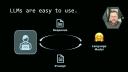
When you think of large language models, maybe you think about hundreds of billions of parameters or trillions of tokens, whatever that architecture of a transformer really is, they can seem untouchable and complex. I don't know about you, but I don't have tens of millions of dollars to go train a new one. And so it can feel like there's not much for us to do. But when we think about how we use large language models, they're actually quite simple. We write a prompt, send it over to one of those hundreds of billions of parameters models, and we get a response back. Making simple tweaks to the prompt, like including documentation from our favorite packages or maybe even some snippets of code that you found useful, you can augment that prompt to get better and better responses from those models.
Today's talk is going to focus on us as the user of these tools and how we can use them right inside the RStudio environment and how we can use them to make our work even better. Let's dive in.
Using GPT Studio in RStudio
I want to start with probably the simplest example, which is how you can use a chat GPT-like interface to query OpenAI models right from inside of RStudio. As you might imagine, the first thing we need to do is install a couple packages. Those are GPTStudio, usethis, and MiniUI. Once you've installed those packages, open up the .renviron file using a convenience function inside of the usethis package, edit renviron. We'll use this to set our API key, which is how these APIs know that we're allowed to use them. It provides our authentication for us.
We'll be using OpenAI for all of the tutorials today, but I also include examples from Anthropic, the makers of Claude, Hugging Face, which has many NLP models that you can choose from and download locally, as well as Google's Palm model. All of these models can be used within the GPTStudio package.
Once our API key is set and the packages are installed, we're ready to use GPTStudio. To do so, go to the add-ins pane and type chat-gpt inside the search window. You can click the chat-gpt, which will launch a shiny app that allows you to interact with the OpenAI's model. For this example, here's the prompt we're going to use just to show you how the package works. It says, suppose you were analyzing the dialogue from different Star Wars movies using the tidy text and dplyr packages. How would you determine which character speaks the most frequently and create a bar plot that visualizes the 10 most verbose characters?
As you can see, the response from the model streams in real time, and any code examples are highlighted in an isolated window that you can click copy to take the code, paste it into maybe the console, a source document, or maybe a Quarto document as well. The responses from this are much like you would get from chat-gpt, so be aware of things like hallucinations or incorrect code, and make sure you review any code before you actually execute it.
Creating a custom chatbot
That example might be somewhat familiar and maybe even boring to many of you in the audience today, so let's step it up a notch beyond what we could do with simply a chat-gpt-like interface. Let's create our own chatbot. In fact, let's create a Hadley Wickham chatbot. I'll show you how you can do that.
Here's the prompt we'll use to create our chatbot. You are a code assistant chatbot that answers questions and writes code in the style of Hadley Wickham. Your answers are pithy but informative. As the creator of the Tidyverse and chief scientist at Posit, you favor Tidyverse answers to code questions. You are not only answering code questions, but you are teaching our users to become better programmers. So to add this prompt, we'll open up the settings pane of the app. There's a number of different options here. We'll go to task and select custom, and then we'll paste in that prompt that I just read to you. You'll notice there's many more options than I'll have time to cover today, but I have a separate video that you can go watch if you want to see more of the features in detail.
So to see the effect of this, let's copy the same prompt that we just showed you and send it off to the model with our system prompt with our Hadley Wickham chatbot in tow. It might take a little bit of nuance to see some of the differences here, but we're getting a little bit of a different response, and I'll have to leave it to Hadley to decide if he actually thinks that this is in the style of him. There's certainly an art to crafting these prompts and creating these chatbots. So if this is something that's interesting to you, I encourage you to go check it out for yourself and try a couple of different prompts and see how the responses vary as a result.
Text embeddings with GPT Tools
Okay, so this gives you the response of what a custom chatbot could look like, but of course there's more that we could go do with this as well. And for that, we're going to move from the GPT Studio package over to GPT Tools.
A common challenge you'll find when using large language models is that their training data doesn't contain the context that's important to answer the question that you just asked. So giving it missing information, missing context through a technique called text embeddings or a vector database, semantic search, there's a lot of different terms for this, but the basic idea is that we want to give the model the information that it was missing right inside the prompt so that it can provide more contextualized answers, more accurate answers to our prompts. To do that, we'll use the package GPT Tools, and in comparison to GPT Studio, GPT Tools is more experimental. It's more likely to break, but it's also where you're going to see some of the cutting-edge applications of large language models inside of RStudio.
So with that, let me show you how we can create text embeddings of the Tidyverse Style Guide or Tidy Design Principles to extend our Hadley-Wickham chatbot. We'll need to install GPT Tools, which we'll need to do from GitHub since it's an experimental package and not yet on CRAN. You can use the package manager, Hack, to make this easy. The code on the slide shows you how, pointing to jameshwade.com.
Once you've installed the package, and assuming you've already configured your API keys like we showed for GPT Studio, you can then use the function crawl to point to the Tidy Design Principles URL. That's design.tidyverse.org. This function will crawl those web pages and create text embeddings that we can then use for our semantic search application. Let me show you how that works.
Now that we've created our embeddings, we can load the app by typing in retrieval into our add-in. It's been running chat-gpt with retrieval. What this is going to do is when the app loads, we can type our prompt into the box here. So the prompt is, in this case, what do I need to know about writing tidy functions in R? It's going to take that prompt and create an embedding, a vector, that it then can match against the text that we just scraped. The answer that we'll get back is now going to be contextualized with the Tidy Design Principles.
You can see the answer here has some information that comes from that document if you're familiar with it. Things like consistent APIs and avoiding magical defaults might sound quite familiar. Then at the bottom with the sources here, you can link back directly to the original page that it used for the contextualization purposes here. So this gives you a contextualized answer much better than what you would get just by using the default chat-gpt model.
Keeping package documentation up to date
A frustration I've often found with using these large language models to help me code is that they're pretty much always out of date. An update will be pushed to some of my favorite packages, and when I ask for help, the answer I get back from these models is old and not really what I'm wanting to use. When I'm trying to push the edges of some of these capabilities, of course I want the latest documentation, and we can use this text embeddings approach to keep chat-gpt up to date with all of our favorite packages. Let me show you how.
To keep our text embeddings for our package documentation up to date, we first need to list our favorite packages. I have here a list of some of my favorite packages as part of the tidyverse, tidymodels, shiny, some packages for machine learning operations, natural language processing packages, and packages to interface with large language models. That list we can pass to a function called getPackagesToScrape, which will look to see if there have been updates to the package based off the package version. If it's out of date, you can then pass it to scrapePackageSites that will take that list of outdated packages, scrape the documentation, and recreate your text embeddings with the up-to-date documents.
It does its best to not recreate text embeddings for text it's already seen before, to be wise with its token spending budget, but it isn't perfect, and this is likely to be a somewhat expensive operation, I would estimate on the order of maybe a dollar or a few dollars if you're using the OpenAI text embedding endpoint for this. With these updated packages, you'll now get your responses coming from the querying chat GPT that provides the context for the latest and greatest from your favorite packages.
Accessibility and community
Most of what I've focused on so far is how we can use these large language models for productivity tools, but I want us to think a little bit beyond that, and specifically I want to give you two examples. Professor Michel Nouvard has taught me a lot. He's the original creator of the GPT Studio package, and he welcomed me at first as a co-author and eventually as maintainer of the package. Michel taught me what large language models can mean for accessibility.
Michel's dyslexic, and because of his dyslexia, he finds that tasks that others might find trivial like writing academic text or even crafting a trivial email to require deep work and focus from him. He takes issue with critics of large language models thinking that they only regurgitate mindless English. He says that these people have no idea how incredibly hard it is for me, Michel, a dyslexic non-native, to produce passable English. In addition to his academic duties, Michel is now training his own R-specific coding models inspired by the utility that he has found for his dyslexia and wanting to extend that to others. I hope to share more on these R-specific models soon.
He says that these people have no idea how incredibly hard it is for me, Michel, a dyslexic non-native, to produce passable English.
Another package co-author, Samuel Calderon, a data analyst at the Ministry of the Interior in Peru, taught me about the importance of language barriers in learning to code, and his experience mentoring peers in Peru, he found that they would often give up if the source documentation was not in their native language, finding it difficult to learn both another spoken language while also learning how to code. Because of his insights, the GPT Studio app now includes translations into Spanish and because of another open source contribution, German as well, to make it easier for others to use, but to also make them feel more welcome in using the app. I should also note that Samuel is the reason that we have streaming in the app. These are only two lessons, and I'm sure that I have many more to learn.
How you can contribute
Now that's where you come in. These packages, in addition to some others like Chatter or OpenAI, if you want to make direct queries to the OpenAI's API, are still wide open. They each have single digit numbers of contributors, maybe a handful of issues and a couple open pull requests. It's a wide open landscape for you to contribute code and help define how we use these models. If you don't want to contribute code, I strongly encourage you to become users of some or all of these packages. Help us learn how we should use these large language models to help us get our work done. Help us make R the best place to use these large language models. Thank you.
