


Greg Wilson | Teaching Online at Short Notice | RStudio (2020)
So here you are: you planned to teach your class or deliver your workshop in person, and now you have to do it online or not at all. Nobody is giving you time or money to make the change, and a hundred other things also need your attention. Where should you start, and what can you realistically hope to achieve? This one-hour webinar will present answers from people who have found themselves in this situation before, and will recommend a handful of techniques that you can apply right away. Webinar materials: https://rstudio.com/resources/webinars/teaching-online-at-short-notice/ About Greg: Dr. Greg Wilson has worked for 35 years in both industry and academia, and is the author or editor of several books on computing and two for children. He is best known as the co-founder of Software Carpentry, a non-profit organization that teaches basic computing skills to researchers, and is now part of the education team at RStudio
image: thumbnail.jpg
Transcript#
This transcript was generated automatically and may contain errors.
Hello everyone, and welcome to this afternoon's webinar. My name is Greg Wilson, I work for RStudio on the education team, and we've put this one together to help everybody who is finding themselves moving their teaching online at short notice. I'd like to thank Robert and Curtis for setting up all of the mechanics for this.
And there is a question tab in GoToWebinar. Please throw questions into it at any time during the presentation, we'll field some of them during the call, and we'll gather up the rest at the end. All right, let's get rolling because it's a big world in a short day.
So you all had plans, you all had some idea of how you were going to teach a course this semester, how you were going to deliver that training workshop, and now all of a sudden you find yourself in an off-road vehicle at night. We've all of us been thrown off our plans in the last couple of weeks, and quite reasonably a lot of us are afraid that things are going to crash out bad. We're here to help.
What we're going to do in the next 45 minutes is give you a few tips that we hope will help you move your teaching online without crashing. It's not the best you could possibly do, it's what you can do in a hurry with the tools you've got and the time you have, because like your learners, you're probably now wrestling with a whole bunch of issues around looking after kids or elderly parents, travel plans being canceled, everybody and their cousin being on bandwidth at the same time. We're hoping that these tips will help you get through that.
Now this is the persona I had in mind when I developed this deck. She's pre-tenure faculty, also teaches in industry. She's comfortable using modern tools. She FaceTimes with her partner all the time. She struggles a bit with her school's learning management system, but that's Blackboard's fault, that's not hers. And now she's got to move a class of 80 people online in a week so that they can finish semester more or less on time. And she's also got a couple of workshops that she signed contracts for. She really doesn't want to have to cancel out of those.
Rule one: don't change what you don't have to
And I put this concept map together in order to figure out what I was going to cover. I wound up covering more than this, so I'm going to skip and go to the first and most important rule. And if you take one thing away from today's talk, I want it to be this, don't change what you don't have to.
Now, there's an old saying, if you're going on a long walk, you wear old shoes. You don't wear new shoes if you've got a long way to go. Please don't try to change 19 different things about your class, because you've heard that the right way to teach online is to use X or do Y. Right now, running late, running without extra resources, what we want to look for is the smallest possible changes we can make, and that's what I'm going to be focusing on.
The second rule, and this one comes from Elizabeth Wicks at the University of Illinois, please don't make assumptions. Please ask your learners, your students, your colleagues. They aren't going to have the same bandwidth that you have. Their network might not be as reliable. Their computer at home might be a six-year-old hand-me-down, because they're no longer at the university. In a corporate environment, it might be the very first time they've had to use stuff over a VPN, because they're used to going into the office.
They may not have the attention span they used to, because of all of these pandemic-induced distractions. So, rule number two, go and ask them. Nobody will ever be offended if you say, what kind of device are you on? How much time do you realistically have?
On recorded video
The next recommendation I've got is, please don't try to be or to beat the kind of recorded video you see in polished, produced courses on sites like edX. It takes a lot of time to edit up even a simple video, and it takes a lot of time to learn the tools you use for editing those videos. You probably don't have that time right now. I'm not saying that recorded video doesn't have its place. We're going to record this webinar and make it available to people. But right now, I think in the short run, your best bet is to try to use things interactively and worry about recording and editing and publishing video later.
If you're going to ignore my advice and go ahead and start doing it, there's a really good paper from 2009 by Chen and Rab called A Pattern Language for Screencasting. They take a lot of apparently straightforward ideas and organize them in a sensible way. Their concept map is up here on the screen. There's just a whole bunch of good tips here about what makes for a good screencast, what makes for a good online video, and how the parts fit together so you know what not to do or what not to venture into. All of these slides, by the way, are going to be available after the talk. So if you haven't copied down that URL, don't worry.
Mistakes are the pedagogy
Next thing I'm going to say is the mistakes are the pedagogy. Depending on whose numbers you trust, a professional programmer spends 20% to 60% of their time debugging. A novice spends 80% to 95% of their time debugging because they're a novice. The same is going to be true in most areas.
This comes back to the larger point that when you're teaching online interactively, when you're doing what I'm doing right now, you learn the song but then you improvise over it. I've got a slide deck. It has speaker's notes. I'm really glad that I prepped all of that because it got me to think through the things I'm going to say. But now what I'm actually saying on any given day is going to be partly improvised. It's going to depend on the feedback that I'm getting from my audience. It's going to depend on thoughts that I have now that I'm presenting, and that's okay. The better you know your material, the more comfortable you will be improvising, but don't think that you have to stick to exactly what you planned the night before.
When you're teaching online interactively, when you're doing what I'm doing right now, you learn the song but then you improvise over it.
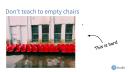
Teaching to a room full of empty chairs
The corollary to this is it's really, really hard to teach to a room full of empty chairs. All of us all the time are picking up social cues. We're constantly peripherally aware of whether somebody is nodding or whether they're checking their phone. Did they just yawn or are they thinking because they're about to ask a question? You might not notice that you're noticing, but you notice. And as soon as you start teaching online, a lot of that is taken away. If you take all of it away, you're going to find it very, very difficult to teach.
What I suggest you do is get your students into some sort of webinar like this, but then have a few of them turn on their video so that you can see a few people. If, for example, you're using Zoom, which is my preferred video conferencing tool, take a half a dozen names at random and ask them to turn on video, and then focus your attention on those six. Ask them your questions. Pay attention to their faces just as you would in a real class. And in your next class, pick a different half dozen.
This teaching practice predates video. It was quite common. It still is in some places. If you've got a large class, to pick a few people, bring them down front and focus your teaching on them for this hour, but then focus it on a different half dozen for the next hour and so on. They get individual attention. You get the kind of responsiveness you need to make improvisation and teaching lively. And everybody else now has permission to turn off their video and reduce the load on the system.
If you're going to do this, please give people a way to opt out. For a whole bunch of reasons, a lot of people are uncomfortable being on video online. If you've ever had to deal with harassment or a stalker, you don't want images of yourself appearing that might go out of your control. People have many other issues. If they're working at home for the first time, for example, maybe they don't want others to be able to see the mess in the background, the kids playing, and so on. So invite people, don't mandate it, but try to get, as I said, four, five, or six people that you're directing your teaching to. That will keep you engaged and you'll do a better job with the teaching.
Directing traffic and managing audio
The next one was recommended by one of my colleagues, and I'm embarrassed that I didn't think of it because it reveals my expert blind spot. The first time you move your class online, give them a tour of the tool that you're using. They probably haven't seen Zoom or whatever you've got. They might not know where to click the button to mute. Seems obvious once you know, it's anything but if you've just been thrown into it.
So taking 10 minutes at the start of your first online lecture to show people how you're expecting them to use the tool, or taking an hour beforehand to take a few screenshots and then share those with the class, can save a lot of grief. If you're going to do this, make sure that you're logged in as a normal user, not as the teacher or the conference organizer, when you're giving the tool. Because if you're logged in as a super user, you will see a different set of tools that they don't have, and that will confuse them.
The next one up is to direct traffic. You don't have to go full North Korean, that's where this picture's from. But again, for a lot of people, this is their first time being in some sort of structured formal setting online. So always give them verbal cues. Ask them to put their questions in the chat. Ask them to add their answers to a homework question to the shared Google Doc. Call on them by name when you want them to speak, or ask them to type something like slash hand or raise hand in the chat when they want to speak. Make sure that they're all getting direction about what they're supposed to do next.
After a while, you can dial that down. But I have found in my own teaching that I don't. I constantly do it because I've constantly got people who are new or who are coming in from somebody else's class where they might have evolved a different set of conventions. Whatever it is, you as the tour guide telling people now we're moving on to the Renaissance Arts section, everybody step this way, again, it takes away a lot of the uncertainty. And right now, people have got enough uncertainty to deal with.
One other point on this, mute early and mute often. By default now when I'm in Zoom, after somebody finishes speaking, I don't wait for them to mute. I don't even mute them. I instinctively now hit the mute all button. I put everybody back in a muted state, even if they don't need to be, because that way I never forget to.
You can do a very good class audio only or audio with slides. Video is helpful, but it's not essential. And I can prove this by asking, what would happen if we left you with video of me talking right now but turned off the sound? You wouldn't learn anything. You've got to make sure that everybody can be heard. You've got to make sure that you're not drowned out by feedback, by background noise, or crucially by somebody who constantly wants to be the next one to ask the question and constantly wants to jump in first.
One thing that I do to ensure that is I actually keep a written list of names beside me of the people that I'm focusing my teaching on, that half dozen I referred to earlier. Every time I interact with them, I just put a tick beside their name. So that I can very quickly see who I have been talking to and who I haven't been talking to. That way I can distribute my attention more or less fairly among those half dozen. And if somebody is constantly trying to jump in, I can say, no, it's not your turn. We're trying to take turns here.
If you are relying on people to unmute themselves and just jump in with their questions, your class is going to be dominated by a couple of extroverts. And everybody else will very quickly learn to not even bother to try to ask questions or to contribute ideas because they can never get in fast enough. Mute early, mute often, and then have people request the microphone in order to speak so that you do the unmuting. And as I said, call on people by name.
If I ask the room, are there any questions, it will be followed with silence. Sometimes that silence means nobody has any questions. Sometimes that silence means people have questions, but they don't want to look foolish. And sometimes that silence means they're very busy typing and the question is going to pop up in 15 seconds, by which point I will probably have moved on.
Instead, when I want somebody to contribute, I call on them by name. And if they want to pass, if they say, I don't have an answer, I don't feel like this is the right time, that's fine, I'll move on to the next person. Calling on people by name also helps you level out your classroom. You are about to discover that some of your learners think much more quickly than others. That doesn't mean they're smarter. Doesn't mean they're producing better work. It just means that their first response comes faster.
Don't teach alone
This is all a lot to manage. So this brings us to the other big takeaway. Don't teach alone. If you can possibly avoid it, don't be the only person trying to run things. Every great surgeon has a great nurse beside her. Every great teacher has a co-teacher. It could be a fellow instructor, it could be a TA, it could be one of your learners that you've approached to say, you seem to be okay with this material, can I ask you a favor?
Whoever it is, you want somebody else keeping track of whose turn it is to speak next, somebody else making sure that the slides are presenting properly, somebody else who is wrangling that shared document that we're going to talk about in a couple of minutes. You want a co-pilot who's worrying about everything that isn't the actual delivery of the lesson in the moment to free you up to focus on your slides and what you're saying. I've got that right now, and it makes a world of difference.
Practical setup tips
So, do a dry run. I have a list someplace of things that have gone wrong while I've been teaching. I've fallen off stage twice and concussed myself once. I've had a fistfight break out, I've had a projector catch fire, I've had a woman go into labor, and I once actually fell asleep in one of my own lectures.
Those are the easy ones. The hard one is nobody told me there was a firewall, so all of a sudden I can't get at any of the data sets. Nobody told me that they've updated Zoom and some of the controls have moved or behave differently, or I know all of that, but I've never done it with Robert, I've never done it with Karina, and so we're used to using the tool in different ways. Getting 10 or 15 minutes, half an hour before you're supposed to start talking, can make a world of difference to delivery and it can lower your blood pressure considerably.
Another small note, keep your notes beside you. I've got a laptop on my desk and then I've got a large screen monitor above it. I think that's a fairly common setup these days. What that meant was that going back a while, whenever I was teaching, I was looking up and had my head tilted back, and my daughter eventually told me that as far as she was concerned, my webcam was a nose cam, and that's why I don't have a picture for this slide. If you've got your notes beside you, it's very natural to turn your head to the side, check what you're going to say next, and come back to your lecture. If you've got the slides up here, it's not something you're used to doing, and the angle can be rather unflattering. I know it's a small thing, but the small things add up.
Accessibility and speaker's notes
A much larger thing, please add speaker's notes to your slides. You are about to discover that a lot of your learners have trouble seeing or hearing. They've got good compensating strategies or accommodation strategies in a live classroom because they've got a lifetime of experience doing this. They may not have the same support now that you're bailing everything online.
If you put speaker's notes in your slides, it makes the slides more findable because search tools know how to index them. It makes the slides more usable because people can understand after the fact what you meant by that picture, but crucially, it makes them more accessible, and however hard you think life is suddenly being thrown online, it's a lot harder if you're partially sighted or fully deaf. Please don't make life harder for people who already have more to struggle with.
In fact, using accessibility tools helps everyone. I don't know if you can see my cursor right now, but I've used the accessibility tools on the Mac to make it as large as possible so that it's easier for people to see on video. I do that whenever I'm teaching. I use an enlarged cursor because a small cursor in a small window is really, really hard to see. I switch to high contrast mode so that people who might be sizing down the screen or might be on older devices or might just have crappy monitors have a better chance of being able to see what's going on.
All of these tools help. Keycasting tools that will show people on screen all of the control keys, option keys, and other things that you're typing. You should be using those anyway when you're teaching so that somebody doesn't think you're typing 100 characters a second. They realize that you hit tab and got file name completion. Keycaster is one that you can use. Mouse Pose is another. There's a lot of accessibility tools out there. Most of them are either free or very cheap. Most of them are fairly easy to set up, and they will all help with your online teaching. And when you're done, keep using them when you go back in the classroom because they'll make life better for everyone.
This recommendation comes again from Elizabeth Wicks. Teach from your smallest screen. If I try to take my half meter wide monitor and squeeze it down into a little video window, the video quality is going to be pretty grainy and the bandwidth demands are going to be pretty heavy. I'm not suggesting that you teach from a tiny handheld device like this, but please remember that most of your learners will be using smaller and older gear than you've got. You want to be at the bottom of the pack when you're the one sending out the video because that has the greatest chance of working everywhere.
And I'll add a personal footnote to this. It's difficult to teach with an IDE when you're screen sharing because once you've sized things down, all of the controls in the IDE for different tabs, different menus, and so forth, all of those things that are really helpful, they're taking up a lot of space and you don't have a lot of leftover real estate for your own typing. I have seen people put RStudio IDE into a mode where only one pane is being shown at a time. That's great from a real estate point of view, but now it looks very different from what people are used to. I don't have a solution for this one. Ask your learners what they prefer.
Voice, microphone, and notifications
Going back to a topic from a few minutes ago, your voice matters more than your face. You can switch off video or you can go to still images like this one and give a decent class. You cannot lose voice or voice quality and still have a decent class. My setup is a Samsung microphone and a $25 stand from my local music store. I got the stand so that the microphone would be far enough away from the keyboard that it wouldn't be filled with all the clicking as I type. You can still hear the clicking, but it's a soft background noise rather than thunder.
Again, try out your rig with your co-instructor or with some randomly selected student, or if you don't have anybody else, mail me and I will listen to it. But getting the mic up level with your head, about 30 centimeters away from your mouth and away from your keyboard, and that's as much as you need to do now. If later on you want to go get spit guards and swaffles and do the full rig, absolutely, knock yourself out, but you don't need to do that first week.
What you do need to do is turn off your notifications. You don't want things popping up on screen constantly telling you that you've got mail, that you've got something on Twitter you should be looking at. I turn Slack off completely whenever I'm teaching unless I'm using it to communicate with my students because it's just a distraction. You can ask them to turn theirs off as well. I know that most won't.
And if you go into an in-person classroom, stand at the back and look over people's shoulders, at any given time about a third of them are doing something on their laptop. Some of it is course related, some of it isn't. Once they're in an online environment, there's going to be more of that, but it's worth asking. Again, if you've got a focus group of about half a dozen that you're directing most of your teaching to, they're more likely to switch off distractions and actually be engaged because they're being called on with higher frequency. So you can get a high quality experience for a small group and everybody else is going to do what they would do anyway.
The shared document
Now we come to that shared doc that I've been talking about. Every time I teach online, I create something like a Google Doc or a HackMD, for those of you who love Markdown, and I give edit permission to the people I'm teaching. Whenever I ask a question and want a response from everybody, I now have options. I can either tell them, put it in the chat, which I will do if I'm looking for a one word or two word response, or if I'm asking something a little larger and they need to show me a bit of code, write a couple of sentences, something like that, they paste it into the document.
I say paste it in because a lot of people don't want you to see them typing. I'm comfortable with that, but I've been doing this for years. What I see a lot of newcomers do is have a separate text editor where they're composing their answer to question number three, and then they'll copy it and they'll just paste it into the Google Doc. That's cool. As they become more comfortable, maybe they'll do their editing directly in the doc so that others can see their mistakes and see them being corrected. That's cool too.
The important thing is that it allows you to see their work in real time, and it allows them to see one another's work in real time. That dramatically improves engagement, and you get a lot of peer to peer learning. If you ask people to, for example, find the height of the tallest person in Louisiana in 1920 using a dplyr pipeline, there are three or four plausible ways to arrange the commands to do that. Each person will have one, and then they'll be able to glance at a few others in the document and go, oh, that's cool.
It's exactly like what we do in a music class where I say, okay, Janet, you play this piece. Okay, now, Janine, you play this piece. We're used to seeing and hearing others work in live contexts. We can do that online, and this is probably the biggest change in my teaching practice over the last 10 years is trusting learners to share work with each other in real time.
This is probably the biggest change in my teaching practice over the last 10 years is trusting learners to share work with each other in real time.
A couple of caveats for this. Number one, if you're going to do it, keep that list of half a dozen names or the entire class name, depending on how many are contributing to the doc, paste it into the doc before they start typing, and do that for each question so that everybody knows where they're supposed to start typing. If you say, just add this to the doc, you'll have two dozen people putting their cursors on top of each other and colliding with one another's work. That's not helpful. They'll very quickly opt out because it's frustrating. If on the other hand, I've got a list of names with a couple of blank lines between them in a text file, and I paste it into the doc, everybody immediately knows where to type and there's no collisions.
The second thing has to do with scope. Google Doc will comfortably support 14 or 15, maybe 16 concurrent typists. It won't support 30. You'll see a sudden dramatic slowdown at some threshold, and I've never done the experiments to measure where it is, but it's somewhere between a dozen and 20. Again, you solve this problem by having a subset of people contributing to the shared document and swapping that up each time you take a coffee break, each time you restart your class.
Talked about this before, keep track of who has and hasn't spoken to make sure that the people who aren't extroverts are getting airtime. It doesn't have to be electronic, just a piece of paper and a pencil beside you, putting tick marks in, trying to make sure that you distribute your attention fairly so that everybody feels like they're not just allowed in the room, but they're welcome in the room.
Ask fill call and predictions
Ask fill call is a pretty common tactic from the days of broadcast radio. If I ask a question, it's going to take people a while to formulate an answer. If I'm asking them for a long answer, three lines of code, for example, it's probably going to take them 15 seconds and even a gap of seven seconds, which you just heard can be really uncomfortable.
If I want somebody to come in with a question, I ask the question, and then as they're composing their answer, I fill the air. I say something else, I elaborate on a previous point, they'll probably tune me out while they focus on their answer, so it can't be anything too important, but it's like making small talk while somebody is setting the table. You want to ask your question, you want to fill in a little bit so that there's not dead air, and then you want to say, okay, Sarah, now what have you got for us? Again, you're doing this to make up for the lack of social cues. You don't have that peripheral awareness of people's attention, so you're going to have to be more directive.
Another way that you can take advantage of the online teaching is to ask people for predictions. This is particularly important when you're teaching coding. If I'm teaching a programming class, I'm probably sharing my screen so that you can see the code as I'm building it. Every time I'm about to do something, I have an opportunity to say, all right, everybody, in the chat, what's going to happen if I run it now? I've just added this line, how's it going to behave?
Pedagogically, this is forcing people to pull recent knowledge back into consciousness and use it and reinforce it. That will help them learn and remember. From a motivational point of view, it increases their engagement. They're constantly being asked to think and to contribute, and from your point of view, it gives you a very quick formative assessment. For those who don't know the term, formative assessment is what you do during learning to find out whether or not people are learning. It's your real-time feedback loop.
You cannot trust people to go, uh-huh, I got it, I got it, because a lot of people will lie. They'll say they have it when they don't, or they'll believe that they do, but they'll be wrong. And they're even more likely to mislead this way when you're teaching online. If on the other hand, I say, all right, Paul and Ahmed, what's this going to do next? If they're right, you know that they're understanding. If they're wrong, then you know that you've got something to explain, to clarify, or to cover a second time, and you can do it right then and there before their misconception has a chance to set in concrete.
Breakout rooms and peer instruction
This is a point where I would normally poll my class to say how many of you know breakout rooms. For those of you who don't, if you're using something like Zoom, you can go down and put everybody into a small sub-conversation. You can assign them manually, or you can assign them at random. You can vary the size of the rooms, and you can determine how long they're in that side conversation.
Here's a question. The answer isn't obvious. Everybody go and think about it, and then argue with your three partners, and see if you can come to a consensus about what this code does or doesn't do. Three, two, one, go. You've got a couple of minutes, and then I pull you back, and I poll a couple of people.
This emulates a practice called peer instruction, which is the most effective scalable teaching practice we know. The slide deck has a link to a video from a math class in India in 2013 that illustrates the method. Short version is, I ask a motivating question, something whose answer requires more than just factual recall. You all then go and argue with each other over the answer, and then I pull you back and give you the explanation. Why the argument stage? Because that's when you have to think through the inconsistencies or gaps in your mental model, and you've got other people there who can fill them in.
One of the great discoveries is, it doesn't really matter if anybody in one of these little discussion groups is right at the start. What matters is that you disagree, so that you can clear up each other's misconceptions. Pedagogically, it's a well-justified method. Practically, it also helps with motivation, because instead of only teaching to half a dozen for half an hour, you can teach to that half dozen, and then say, okay, now everybody's going into a small discussion group, and then I'm bringing you back, and now they have to interact with their peers.
Again, you want people to be able to opt out. They may not be in a situation where they can have a conversation. They might be in the living room, muted, because the entire family is here at the moment. You've got to respect that. Some people may be uncomfortable arguing with strangers at the outset of a class. You respect that. But for everyone else, it's a very effective technique.
One of the things that we can't do with any video tool I have today is put people into breakout rooms in which they can all screen share with each other. I would really like to be able to put people into pairs and have them screen share so that they can co-program. The technology will get there eventually, but something like that or a shared whiteboard in the breakout room would probably help a lot. We just have to wait.
And since I mentioned whiteboards, Zoom provides polls so that you can ask people questions in real time and do a survey. It also provides a whiteboard. Don't try to use it yet. Become comfortable with the online teaching, sort out some of your other problems, and then start to try to take advantage of all the science fiction you've been handed. You don't need it today. Take advantage of it tomorrow.
Take breaks and be kind to yourself
The quote here comes from my wife, who once explained to me that the basic unit of teaching is the bladder. And I said, I've never thought of it that way. And she said, you've never been pregnant. You need to take a break every hour. Your back's going to get sore. Your voice is going to get hoarse. Your learners are probably in situations that are no more comfortable than yours and quite probably less. And even when they're comfortable, it's a long day and it's a lot of coffee.
Make sure that you set yourself a timer. I do it on my phone and have it go off at 45 minutes. I found that when I was setting timers for an hour, because I always drift a little over, we were only taking breaks about every 75 or 80 minutes. If I set the timer for 45 minutes, I'm pretty much guaranteed a break every hour. Whatever I set it for, I always go over 5 or 10 minutes.
And to wrap up before we start taking questions, I want you all to know that nobody knows anything right now. We've been teaching online in relatively small numbers in relatively constrained technological environments for a couple of decades, maybe three. And on the one hand, that sounds like a lot. But on the other, we are about to invent more different ways to teach online in the next 12 months than we know in total today, because we're about to do a whole lot of experiments.
You're going to suck at this at first, but that's a necessary first step towards being good at it. Don't beat yourself up. And don't be afraid to experiment. Don't be afraid to try things and then to say, all right, that didn't work. I think everybody understands that these are unusual circumstances. I think everybody, I hope, is going to give people a little bit of slack, give them a little bit of allowance because of the unusual circumstances. So there's never been a better time to try new things. Your audience will never be more understanding. And as I said at the outset, we're here to help.
There's never been a better time to try new things. Your audience will never be more understanding.
Recommended reading and resources
Last thing before we dive into the close, if you've got time to do any reading, I highly recommend this book by Brookfield and Preskill. I've been talking about things with people in large groups since I was about 16. Of the 50 different techniques they catalog in this book, for having a productive discussion, I had only ever seen 15, and I've only ever seen five or six implemented online. This is a catalog of ways to get people to talk to one another and share information and make decisions. A lot of them are directly applicable to teaching. And even if you don't have direct customized technical support, they're all social conventions that are fairly easy to adopt in an online environment.
Just to pick one example, suppose I've got half a dozen people that I'm focusing on. All right, I want all of you to put your answers to this question into the Google Doc. Okay, now that we've got those, I want you each to shift down one spot, bottom person comes to the top, and comment on the answer from the person that you're now looking at. Okay, now shift down one more. So now you're looking at an answer and a previous set of comments. People will learn so much from each other, and the peer-to-peer knowledge transfer will make up for so much of what you're losing by not having them physically present. And that's just one idea in a book full of 50.
So here are some links that I found useful preparing this. Jason Bell in Australia, who I believe is here with us today, has a good video on what it's like to teach software carpentry workshops remotely. He's in Queensland. A lot of his learners are scattered. So he's had to figure out over the years how you teach programming when you are hundreds of kilometers away from all of your learners, and they're hundreds of kilometers away from each other.
Elizabeth Wicks, I've cited a couple of times, has a really good set of tips for teaching tech subjects online. There's a growing number of comments in the RStudio community teaching discussion. You're all welcome to join in there. I'm a big fan of the piece that Laura Cernovich wrote in South Africa, what they learned from going online in Cape Town on short notice. That link there includes a sublink to a document about how to accommodate wildly different technical levels among your students. They'll have differential access to devices, to bandwidth, a whole bunch of things. They've got a lot of experience about how you accommodate that. So please follow that one up. And finally, just today, there was another blog post from the Carpentries. They're collecting their tips for teaching online. And again, there are links out to other resources.
Q&A
So with all of that done, I am hoping that some people will have questions. So Leon Jessen is saying that calling people by name is referred to as harpooning and discourage. Yes. Like any teaching technique, it can be used badly. You risk lower tier and introvert students leaving the teaching platform because they don't want to be called out. I respect that. And hopefully you can detect that or you can ask them in advance to message you if they are uncomfortable being called on. Just have them tell you, right? And respect whatever it is they do.
Alyssa Dillman is looking for a list of accessibility tools. Yes. We've got a blog post hopefully up sometime next week. Does a cardioid mic help reduce the keyboard noise? It can. This Samson isn't a cardioid. I've just got it by trial and error. I've got it tilted at an angle where it seems to just pick up my voice and not the keyboard. For those who don't know the term, a cardioid mic picks up sound on one side or the other but not in between. It's a directional microphone intended primarily for interviews where you've got two people on opposite sides of a mic. One of the reasons I got the Samson is that it's a cheap enough microphone that if I lose it while traveling, I'm not heartbroken. A good cardioid mic is going to be more expensive.
Laura Asyon, feel lost reading all the feedback from the students in a shared doc? Do you have any tips to read the feedback? This is part of what your co-instructor can do for you. Normally, when I'm teaching, I will call out one or two, but I've got somebody else there just as I've had Robert and Curtis going through your questions and flagging them, right? So that by the time I get there, somebody else has already done the first pass of filtering.
Rhian Davis, for a smaller class doing quick intros at the start, absolutely, if you've got the time, if they're comfortable doing it. And then Kelsey Carrier, do you have a tactic for keeping track of participant responses when they may have strange or unrecognizable names? Yes. I sometimes now have learners whose name field is an emoji. In those cases, I will ask people, can you please change it for the duration of the session or just let me know how to address you? I find that asking people how do you want to be addressed also helps with internationalization of names and pronouns. I'm quite often not sure which of the several parts of someone's name they're most used to being called by, particularly when I get into East Asian and South Asian cultures that I'm not familiar with. And it's always a good idea to ask people what pronoun they would like you to use.
Students don't turn on their video because they don't feel comfortable. This one's coming from Gabby Sandoval. In many cases, they don't turn it on because they're busy with other things. They don't want you to see that they are also doing their calculus homework while they're supposed to be in your class. I ask them. I try to create an environment in which they're comfortable being seen. Focusing on a small number at a time does seem to help with this. I think it's partly a matter of trust. I'm afraid I don't have anything more specific than that that I can recommend. I think people are going to become more comfortable in a hurry as we all start doing a lot more online in a hurry.
Lynn Williams, how do you work with Google Docs and HackMD when it's new to your class and they've said its use is overwhelming? Really good question. I don't use it on day one. I will sometimes for instructor training because we've only got day one. But in a lot of other circumstances, I'm going to introduce these practices to people one at a time over the course of several lessons. First day, just get them used to using Zoom and taking turns speaking because that's the most important thing. Second class with them, get them used to the idea that when I ask a question, they can all give short responses in chat. It's not archived. It'll fly by. I probably don't even read all of them, but I'm getting them used to contributing. Things like a focus group, things like turning on their own video, things like using the Google Doc, lesson two, lesson three.
Coming down a bit, how do you make sure each student is paying attention? You can't. And this is from Mateus. We can't do it in person either. I remember very clearly being in an electrical engineering class watching a colleague teach. And since I was standing at the back and looking down these rows of seats, I could see that almost a third of the students were playing poker online during the lecture. We're not going to do better than that when we shift them all online. What we can do is the best we can with the tools we have.
Karina Marks, whereby.com, Skype for Business, Microsoft Teams. I like whereby.com a lot. For those of you who haven't seen it, it uses modern web standards like WebRTC. It's a beautiful little tool. I think Skype for Business is a really good advertisement for Zoom. I was on a Skype call Tuesday night for the first time in ages with my guitar teacher. And we're going to try Zoom next time. I haven't used Microsoft Teams. I'd be interested in other people's experience of using it as a teaching platform.
Is there a way to help teach us how to use Zoom if we never have? From Michelle Connor. Okay. Mail me. I'm greg.wilson at rstudio.com. We'll set up a session. We'll show you what we know.
Other recommended platforms for video calls from Marina Julias Cabezas. I'm in Toronto, Canada. I know what works here. I would be very grateful for comments from other people about what has worked where they are. I don't know what a good video conferencing solution is in Argentina or Malaysia or South Africa. I don't want to give you misleading information, but please, throw it into the RStudio Community channel or throw it to me and I'll share it.
Why is dead air so bad? A couple of moments of quiet time after hearing a question is fine, but a couple of moments really does mean a couple of moments. People will become very uncomfortable with a silence like the one I just did, right? If they've got video and can see that you're still there, that reduces it a bit. But it is still uncomfortable to have a long pause.
And Jeremiah is asking, these are great, but many ideas relate to live or asynchronous teaching. With my students scattered, this won't work. Any advice on making asynchronous teaching compelling? That one's actually easier to do online because you're already doing a lot of it. You're probably already publishing your slides. You're probably already using some sort of homework submission system. You probably, hopefully, already have some sort of discussion forum or board or mailing list set up for your class. That stuff won't change.
If your administration is pushing you to record and publish videos on short notice, please push back. It's a lot of work. If you're worried about burning up, particularly now that you're juggling everything else, that's going to be the one that breaks you. If you're already doing async teaching with text and images and static documents, that's the way you want to run.
Leon Jesson, I could see it was online, and during the four-hour class, I lost some of the lower-tier students. So Leon, I would ask, did they drop out because it was a four-hour class? Four hours is a long time in one chunk. I mean, human attention is 45 to 90 minutes without a reset. I think if you're putting people into a four-hour class, you're going to lose people for a whole bunch of reasons. I couldn't do it these days because of my back. I simply can't sit in a chair for four hours at a go.
The second question would be, when you say lower-tier, do you mean people who are less advanced, people who have less technical skill or have a less solid grasp of the material? In which case, they were checking out in your in-person class as well. It just wasn't as obvious. They were physically present, but mentally they had checked out, and now you're seeing it. And one of the things that we get from people logging out of Zoom, logging out of video calls, is that we can actually see who's checking out in a way that we couldn't before. It's not creating the problem necessarily. It's revealing it. And that may sound like I'm making an excuse or trying to explain it away. The honest truth is, I don't know, and I don't know of any research on this.
Amadou Dikho, do you have any tips to notice quickly when you're losing someone during a training? Pair them up with them in groups as quickly as possible so that their peers can support them. Breakout rooms, pairwise discussions, having them review each other's work in a shared document, things like that. You can't give individual attention to a dozen people at once, never mind a class of 50. They can give attention to each other.
The one thing that you have to monitor is that they're not being trolls. Provided attendance is named, not anonymous, you've

