


Winston Chang | Making Shiny apps faster with caching | RStudio
Shiny's 1.6 has a new function, bindCache(), which makes it easy to dramatically speed up reactive expressions and output rendering functions. This allows many applications to scale up to serve several times more users without an increase in server resources. Note: Shiny 1.6.0 isn't yet on CRAN, but will be in the next few days. In the meantime, you can install it with: remotes::install_github(""rstudio/shiny@rc-v1.6.0"") About Winston: Winston is a software engineer at RStudio. He holds a Ph.D. in psychology from Northwestern University and is the author of R Graphics Cookbook, published by O’Reilly Media

image: thumbnail.jpg
Transcript#
This transcript was generated automatically and may contain errors.
Today, I'm going to talk about how to make Shiny apps faster with caching using features from the new version of Shiny, version 1.6.
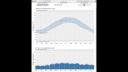
Here's an app that shows average weather patterns over the course of a year. So let's take a look at the weather where I live in Minneapolis. We'll load the data, and the weather here is pretty typical for the continent of the United States. It's hot in the summer, cold in the winter, and it rains more in the summer and less in the winter.
I have relatives that live in the Bay Area in California, and sometimes I compare my weather to theirs, and I feel a little sad. But then I compare real estate prices, and I feel a lot better.
So here's the weather for Redwood City, California. In the summers, it's warm. In the winters, it's cooler, but it doesn't ever get really cold. And in the winters, it rains a lot. And in the summers, it rains almost not at all.
Now with this app, there's a button that you can use to switch between the previous city and the current one. So you can switch to Minneapolis by clicking on there, and back to Redwood City by clicking on it again.
But you notice that every time we do that, it has to re-go out and re-fetch the data and then redraw the plots, and that takes time. And so this experience of switching back and forth isn't really a great one. Now how can we make it better? Well, the answer is with caching.
How bindCache works
Here's some simplified code from the app. We have the weather data, which is a reactive expression, and that calls a function called fetchData, and you give that the city that you want to fetch the data for. And that goes out to the internet, it grabs the data, and then it returns. This takes a while. This is the slowest part of the application.
In Shiny 1.6, we've added a function called bindCache. The way it works is you pass your reactive expression to the bindCache function, and then you tell it what to use as the cache key. In this case, it's input$city. So the first time you have a particular value of input$city, it will run the reactive expression and store the value in the cache. And then if you ever have that same value again, instead of having to recompute the reactive expression, it can just fetch the old value out of the cache. And in this case, that means we don't have to go to the internet to fetch the data.
The other part of our app that takes significant time is the plot rendering with renderPlot. And as it turns out, you can use bindCache with renderPlot as well, so that the plots for a particular city, instead of having to be recomputed every time, they can be simply fetched from the cache. And this can really speed things up.
Seeing caching in action
Okay, let's look at our app again, but this time with caching. So all we did was add bindCache to the reactive expression and to the renderPlots. And that's it. Now when we look at these cities and switch back and forth between them, it's pretty much instantaneous. Because instead of having to fetch the data and recompute the plots, it just grabs the plots and the data right out of the cache, which is very, very fast.
Because instead of having to fetch the data and recompute the plots, it just grabs the plots and the data right out of the cache, which is very, very fast.
So we've seen bindCache used with reactive and with renderPlot. And I should mention that before Shiny 1.6, it was possible to use caching with plots by using the renderCachedPlot function. But that's now equivalent to using a renderPlot and bindCache.
But it doesn't stop there. You can also use bindCache with other render functions like renderText. And it will even work with render functions that are not in Shiny itself, like renderPlotly from the plotly package. All you have to do is add bindCached to the end of it. If you've written one of these render functions, in most cases, it will just work with bindCache. But if not, typically the changes that you need to make are quite small, just a few lines of code.
Cache details: size, scope, and lifetime
There are a few details you might be wondering about. So first is the size of the cache. The default size is 200 megabytes in memory. Now that size can be changed. And instead of using it in memory, the cache can also be stored on disk.
Next the scope. The cache is shared across all user sessions of an application by default. And that means that if one person fetches a particular dataset or views a particular plot, then other users can benefit from that. But if that's a problem for your particular use case, then the cache can be scoped to just one session instead.
Next the lifetime. A memory cache is discarded when the app exits or it restarts. But a disk-based cache can persist across app restarts and can even be shared across multiple simultaneous R processes serving up the same app, as you might do with Connect or Shiny Server Pro.
Thanks for listening, and I hope that you find bindCache useful for speeding up and scaling up your Shiny applications.
