


Thomas Lin Pedersen | Extending your ability to extend ggplot2 | RStudio (2020)
The ggplot2 package continue to be one of the most used frameworks for producing graphics in R. While being extremely flexible, the package itself can be constrained by the different types of graphic elements and statistic transformations available. Instead of continuing to add new features, the development in recent years have focused on making ggplot2 extensible by other packages, thus distributing development and maintenance. Despite the best of intentions, ggplot2 can feel daunting to extend, due unusual idiosyncrasies, a foreign object system, and a partly obscured rendering model. This talk intend to remove the mystery of extending ggplot2, by describing the basic ways that it can be extended and showcasing a couple of simple extensions that can be build with very little code. Lastly, it will include discussions of some best practices and gotchas that may come in handy when you start out

image: thumbnail.jpg
Transcript#
This transcript was generated automatically and may contain errors.
Hi everyone, it seems to be working. So I'm here today to talk about some of the extension mechanisms that have been built into ggplot2 and maybe kind of demystify them a bit in the process because I don't think there are too many who knows about them or at least knows how to do them.
So I guess most of you use ggplot2 or have used it, but just a quick show of hands, who has looked into extending ggplot2? That's pretty nice. That's more than I expected.
So 20 minutes is precious little to talk about the extension system because it's big and it's sprawling and it's somewhat complicated. So I'm just going to give you a quick overview about it and then in the end I'm going to kind of point you in the direction of where to learn more. And I'll of course be here and you can talk to me all you want after the fact.
History and motivation for ggplot2 extensions
So ggplot2 has been gradually expanding its extension mechanism from the point where it gets introduced in ggplot2 version 2. Before that it was kind of a here be dragons situation if you wanted to extend ggplot2, but at that point we, or Hadley and Winston at that time, decided to kind of formalize all of this.
Part of the reason was that people kept asking for new things in ggplot2 and ggplot2 is already pretty big, as has been discussed before, and it's simply not feasible for us to include all possible visualization possibilities into ggplot2 itself. It's much better to kind of spread it out on multiple maintainers, multiple specific packages and so on. So the better extension system that we get, the more is simply possible for you guys.
There are a bunch of extensions point at this moment. There's themes and there's scales and there's, yeah, you can see them all up there. They are not arranged kind of randomly because they are not equal. There are some that are dead simple to write and there are some that are, well, frightening. And that's just how it is because some things in visualization is kind of frightening. Not in the sense that you will explode or whatever, but it's just some things are just extremely difficult to do.
And facets is absolutely one of the worst things to do. So I'm not going to dive into that at this moment. Further, there are some other stuff. There are a guide system that is being overhauled at this moment, and there is also a theme element. So Klaus showed the element markdown theme element, and it should work now, but we're still in kind of a phase where we are figuring out precisely how we want to approach this.
So while you may be able to do it right now, and there are guide extensions, but they are not kind of officially supported at the moment. So just hold your horses for a bit with that if you can, and otherwise just be prepared for breaking code at some point.
There is also a danger zone to look out for. So these are actually possible extension points. You can define what should happen when you plus something to your ggplot for a new kind of object. It is possible to define how the rendering should happen, but this is definitely one of those hereby dragon things. You may want to do this. This is patchwork, gganimate area. Those could not work without these kind of extension points, but it is also one of these things that you can really blow up your package, and when we change something in ggplot2, you may have to rewrite a considerable amount of code. So if you don't need it, don't go there.
Themes: the easiest extension point
So just to start off real quickly with maybe the easiest way to extend ggplot2 is to make a new theme, and new themes are really, really relevant. You can define your theme for your corporation or whatever, and they are really easy because it is really just ggplot2 code. You are used to defining themes when you are doing your plots, and you can simply wrap that in a function. Instead of using the plus mark, you use this replace operator, but other than that, this is simply ggplot2 code as you expect it to look like, and you can, of course, do things that are much more interesting than putting a red background on your plot, so you can just go crazy there.
Understanding ggproto
But this is also like the extent of normal code that you will see in extensions. There's a reason why I'm here, and I'm talking to you about this, because all the other things are based on this entity called ggproto, which is, yay, another object-oriented system in R. And ggproto is kind of this weird object-oriented system that is only relevant for ggplot2 extensions. It is tailor-made for ggplot2.
The reason why it's something new is that it needed to be a reference-based object-oriented system, and the current or at that time current object-oriented systems didn't allow subclassing objects between packages. So if you want to make extensions, of course, you need to be able to subclass between ggplot2 and into your own package. So Winston sat down and made something new.
The good thing about this, in some sense, is that ggproto is completely hidden from the user. So if this is the first time you hear about ggproto, fear not. This is how it should be. But on the other hand, it's also weird. So when you want to transition into writing extensions, you come into this completely new territory that you've never seen before. So code may look foreign to you, because it's a new system and some new semantics. But don't worry, because it's not really as bad as it should appear.
But don't worry, because it's not really as bad as it should appear.
So basically ggproto is this scaffolding thing that holds all of ggplot together. And it is used to orchestrate all the rendering and all the mechanics of how ggplot uses your data and transforms it into a plot.
So when you think about how ggproto at least should be used when you're writing extensions to ggplot2 and how ggplot2 uses it itself, is that you have to think about ggproto classes as somewhat of factories. These are classes that are stateless in the sense that you have an object, and it receives some data, and it does something to the data, and it spits out the data again. It doesn't keep track of what it has been doing in that sense. So this is really important, because when you plot a second time, you don't want it to change. You want it to behave as it should be every time you plot it. So all of these ggproto objects are more or less stateless.
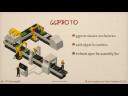
There are a few that you shouldn't touch that are not stateless. But for every kind of idea of extensions, you should think of these as kind of factories. You have this assembly line, and each method is kind of this type of small robot arm or whatever. It doesn't change what it is doing between the different things that run through the assembly line. And methods for these classes, they span the assembly line. So a class is not an object or a class is not really an area of the assembly line. They are grouped based on what type of thing they are doing. So we have stat ggproto classes. We have geom ggproto classes. And they might go in at different times in the rendering process and do their thing.
So more formalized, we have this idea that we have generally in ggplot2. We take some data, we run it through some transformation, and there will be a plot. And ggproto objects are really these kind of entities that sits at various points through this pipeline of data to plot. And they have methods, and they modify the data, and then some other object takes over. And that's modifying the data, maybe spits it back into the same object and so on and so forth. And then suddenly a plot appears, hopefully not disappears.
Key ggproto methods
So there are a few things in the ggproto classes that are shared between a lot of the different implementations. And I'm just going to point out a few of them. I'm not going to get too much into exactly how you're going to write a new faceting function or how you're going to write a new position adjustment or whatever. But just kind of highlighting a few of the things that you might potentially stumble into when you're starting out with writing extensions.
And one of the things that appears in almost all of the different extension points are this setup param methods. And the reason why it's there is because, as I said, your objects are stateless. But if you want a state, and usually you want something, some kind of state based on the data that you have in your plot, this is where you can get it. So this receives the data in the layer, and it receives it together with some of the parameters that you have defined when the user calls the plot. And it can do whatever, and it can spit out a list of parameters that the ggplot2 rendering system then takes hold of. So it's not changing this data search, but it is returning a list of parameters that will get passed in to the other different methods. So it's kind of a pseudo stage that you are able to do.
And one of the places where it's getting spit in again is in this setup data method that a lot of the different methods has as well. So it receives the data as well, and it receives these parameters that you have just calculated. So it's stateful, but it's just handled outside of the class. And what you can do in the setup data stage is that you can reparameterize data, which is actually kind of a powerful concept.
There are a few geoms in ggplot2 which kind of does the same thing. For instance, you have geom segment, and then it's lesser well-known sibling called geom spoke. And the only difference between these two geoms is that geom segments takes the end points of a segment and draws a line, while geom spoke takes a start point and an angle and a length and draws a line. But behind it all, everything it does is really geom spoke is a subclass of geom segment, The only thing it does is it has a setup data which takes an angle, a start point, and a length and calculates the new end point. And then everything else just happens automatically.
So if you have these kind of reparameterized stats or geoms, it's super simple to make an extension, because the only thing you have to think about is to subclass it, provide a new setup data method, and you're good to go. Everything else will just happen automatically. So this is a super important part, and you can really save yourself a lot of work by just thinking about whether some of the things that you want to achieve is already handled by something else.
You can also do stuff like make sure if there are some columns that you need to have, but the user doesn't necessarily want to define all the time, you can just inspect your data and see, well, does it miss the width column? Well, OK, we'll set it to something sensible and so on. And just make sure that at this point, the data kind of makes sense for all of the remaining steps of the object.
Another quite important thing, especially when it comes to creating stats, which is kind of one of the best places to start when creating extensions, is that the computation part, like the meat of a stat element in ggplot2 is this kind of tired succession of calls where you have a compute layer method, and by default, all it does is it's splitting up the layer data by the panels, and then it calls compute panel. And compute panel, by default, just splits up the panel data by the group aesthetic and calls compute group.
So depending on where you want to sit in that kind of succession, you can define a compute group method, which is kind of simple because you know you're only getting data for a single group at a time, and it may make it a lot easier to kind of figure out your computations. But there's a lot of things that can be vectorized in R, and it might be stupidly inefficient to compute the same thing per group. So you can just instead define a new compute panel method that does not call compute group but does everything in one step. So it's usually easier to start at compute group level, but you can quite easily make your geoms and stats more efficient by thinking about how can we efficiently do this in a vectorized manner.
And these compute things, they simply just take some data along with additional parameters, and it spits out a new data frame. So this is a very simple part of this kind of assembly line where it just takes data, adds something to it or transforms it in some way and just spits out data again for the assembly line to take over again.
If you want to do a geom instead of a stat, it's a bit different but kind of the same idea. We have a tight succession of calls again, and it's just draw layer, draw panel, draw group. And again, sometimes you can vectorize things out, and you can really, really speed up your drawing process. For instance, if you think about the geom point, if we had to draw each point once or one at a time and create a function that takes the group and just draws one point one at a time, it will just be horribly inefficient. But thankfully, grid, that is the motor behind ggplot2, can just take a vector of point or coordinates. So we don't need to do this per group. We can do this per panel instead and really speed it up a thousand fold or something like that.
So again, it's easier to start at the group level, but think about how you can speed things up by vectorizing it properly. And this takes in data again, but this does not output data. As Klaus talked about, there's this concept of grub in grids, which is graphical objects, and the purpose of the draw method is simply to return grubs that will then be rendered by grid in the end.
There are a lot of other methods that are being used. All of them are predefined. You will usually not come up with your own method. You will override the preexisting ones. And most of these have sensible defaults, and most of these you don't have to worry about that much anyway.
Building a circle extension
So in the end, I'll just try to put this into effect and make an extension. And we will do something as exciting as drawing a circle, because circles are just the best. And when you start out, you will just start to think about, well, how would I normally draw a circle? What is the defining features of a circle? Well, you will have a midpoint, you will have a radius, and you will maybe remember from geometry that a circle is defined by 0 to 2 times pi radians. That is kind of the different points along the periphery. And you can precompute some points along the periphery, and you can draw this with geom polygon, and all works perfectly.
So when you're in this situation, there's a lot of extensions that are in this situation. We want to draw some kind of shape. We want to draw some kind of line. Well, you don't have to think about how to draw shapes and lines. We already have polygon functionality for this. But we want to take some sort of input, and we want to calculate it inside the rendering code. Then you're in the area of creating a stat, because it takes input data, and it recreates some new input or some new output data that can then be handled by geom polygon or whatever.
So the first thing would probably be to put all of this into a function. So this is really just the same code that I had before the ggplot call. And what it simply does is take some input, and it calculates the angles and creates a data frame with the positions along the periphery. The reason why it's nice to do this is that it's very easy to reuse. It's much easier to debug, because I won't go into it, but ggproto methods are just horrible to debug. So you'd like to have the core functionality nicely defined in functions that you can put browser in or debug them or whatever. It's also way easier to document. So this is just, like, good habit. It's not necessary, but you'll thank me at one point.
So now we have everything we need. We are ready to create our extension, and this is actually the extension. It's pretty nice that you can have an extension that just fits up on one single slide. This is a mouthful, and I'll go through it. One of the things that you need to think about is that you'll always subclass existing classes. So you'll very, very seldom create a ggproto object from scratch. If you want to make a new stat, you will subclass the stat class or one of the other specified stat classes, and you want to piggyback as much as possible. I said that faceting, for instance, is horribly complicated, but you can subclass facet wrap or facet grid, and you can actually kind of piggyback on all the complicated stuff and do some pretty amazing things without thinking too much about the horrible stuff.
So the first thing is the class construction, and we have this ggproto function. We name it. We say inherit it from stat, and then we save it to a stat circ. And then we simply just define our different methods. We have the setup data that we talked about. The only thing that's happening here is that we want to ensure that a group aesthetic exists and that it is different for each row because each row defines a circle. So we simply just make sure that that happens, and then we have the compute group, as we talked about, and this simply just calls our function, and that's more or less it. And in the end, we also have some other things that we can set. We can say, well, this statistics requires a certain number of aesthetics. Here we say, well, you need to specify x zero, you need to specify y zero, you need to specify an r. And then when we initialize this stat transform, we'll simply just say, meh, I don't want to do that.
So this is really it. The reason why you seldom see this type of objects is, of course, that they are packaged into nice little containers, stat underscore circ for the circle for this, or gm underscore circle. I'm not going into detail. These are really, really simple to create, but it's just a lot of scaffolding code, and you can just simply see how it's being done in ggplot2, and it's really simple. It's just a lot of code. So I won't bore you with that.
So now we have our circle. And does it work? Yes, it does. So as you can see, we can now simply use our gm circle inside a ggplot2 call, and it behaves as we expect it to. And the nice thing about this is that this now functions with all the different things that you expect in ggplot2. So you can do faceting, you can do whatever and all that.
Where to learn more
So as I said, this is a very, very brief overview. One of the things that I want to emphasize is that the ggplot2 book, which has been on sale for a long time, we're working on a third edition. It's going to be free, as most of our other books, so you can already see it here, ggplot2-book.org. And I'm working on actual chapters talking a bit about extensions, going into more details about how you will approach this.
And thankfully, we also have a huge community of people that are building extensions. A lot of these are based on or are referenced in this ggplot2-web page. And the best way to learn is simply by example. So there is a lot of examples of creating both super easy extensions and more hairy and gnarly ones. So just go there and look, and otherwise, talk to me, because I'm happy to answer your questions. That's it. Thank you.

