


Lionel Henry | Interactivity and Programming in the Tidyverse | RStudio (2020)
In Tidyverse grammars such as dplyr you can refer to the columns in your data frames as if they were objects in the workspace. This syntax is optimised for interactivity and is a great fit for data analysis, but it makes it harder to write functions and reuse code. In this talk we present some advances in the tidy eval framework that make it easier to program around Tidyverse pipelines without having to learn a lot of theory

image: thumbnail.jpg
Transcript#
This transcript was generated automatically and may contain errors.
I work at RStudio in the Tidyverse team, and today I'll be talking about interactivity and programming in the Tidyverse.
So this is about the notion of data masking in R, which is this idea that you can blend the data with the workspace, so that you can work with the columns in your data frames as if they were objects in your workspace.
And I think that's a really great and unique feature of R, that it helps to turn ideas into software because you're directly working with your data, rather than worrying about the data structure that it is in.
On the other hand, it does make some things more difficult, and in particular, it makes it more difficult to reuse code, to write functions around data masking functions.
So we have made progress in the tooling to solve that issue, and also in the teaching, in our approach to teaching. So if you have learned a little bit about TidyEval before, we'll see some new concepts here. The concepts that you have learned before are still relevant. We still use the bang-bang operator all the time when we create our tools, but this should be considered lower-level tools, and now we are going to see a higher-level approach.
History of data masking in R
So I would like to talk a little bit about the history of data masking in R. So in 1998, the blue book was published that defined the S language, which is the ancestor of R, and a lot of the things that we still use were in that book.
And one of the first manifestations of data masking was in the attach function, which allows you to take a dataset and attach it to the search path the same way that you do with a package. So that's a little bit different from data masking, but it's still the idea that the data frame is the important scope, and that if you are working interactively with R, you want to be able to work with the data directly.
So attach is not the recommended way of working with data now, but a few years later, the white book was published, and it was about all of the statistical modeling functions that we still use in R now, so like the LM function. And the way that it works is that they took a data frame and a formula, and in the formula, you have data masking. You can refer to your columns directly.
And then R was being developed in the 90s, and Peter Dalgaard, who is a member of R-Core, published the frame tools package, which was really foundational for R and for the tidyverse and for dplyr.
And so as you can see, you had the subset frame function, the select frame function and modify frame. And these are the same kind of function that we have in dplyr, like filter, select, and mutate, and you could use data masking to filter rows. You could select columns and modify columns inside the data frame.
And that was the first operation of selections, which is a little bit different from data masking. So in particular, you can use the column operator to select a range of variables that are consiguous in your data frame, and other features that make it really easy to select columns.
So these were integrated in R. Subset and select were merged into one single function. Modify became transform.
And then there were relatively few developments on data masking in base R. The with function was included, and the within function a few years later. But by and large, most of the developments happened in package space.
So in 2006, the data table package was released for the first time. And one of the things that it did besides performance is that it allowed you to use data masking in I to subset rows, and you could use data masking in J, but also selections to select columns.
Then 2014, dplyr was released. So very similar to the ideas that were in the frame tools package, but with the objective to really push data masking in a much more comprehensive API.
The ambiguity problem
So what was the reason that development of the data masking slowed down in base R? I think we can find the answer in the documentation topics for subset and transform. And if you read those, you will see this warning that they are really convenience functions intended for use interactively, that nonstandard evaluation can have unanticipated consequences.
So I think what they mean by that is that it's about the ambiguity between data variables, so variables that are in your data frame, and environment variables, those that are in your workspace and that you have assigned with the R operator. And this ambiguity causes two different problems that are distinct but related. First, you can get unexpected masking from data variables. And secondly, data variables cannot get through function arguments, and that makes it difficult to create functions around data masking functions. And so we are going to see solutions that we offer in the Tidyverse to solve these issues.
So I think what they mean by that is that it's about the ambiguity between data variables, so variables that are in your data frame, and environment variables, those that are in your workspace and that you have assigned with the R operator. And this ambiguity causes two different problems that are distinct but related.
Solving unexpected masking
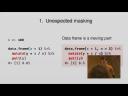
So first about unexpected masking. That's about the problem. So let's say that you have created an object N in your workspace. It contains a number. And you have a data frame with an X column. And you want to modify it, create a new column that divides the column X by the number inside of N. And the problem is that the data frame is really a moving part.
And if you are using the same code with different data frames, maybe they don't contain the same columns. And if you get a data frame that has a column N, then the column has precedence over the object in the workspace. The column masks the object in the workspace, and you get the wrong result.
So that's not a big problem if you are working interactively through your script doing an analysis because you know what kind of objects you have in the workspace. You know the columns that are in your data frames. But if you are writing production code, that can be an issue because your same code will be used across many different data frames from different users.
So the solution here is to be explicit when you are writing production code. And to do that, you use the .data pronoun or the .inf pronoun. And these pronouns are available in all of the data masking functions in the tidyverse. And so here we are, again, modifying the data frame, but this time we are dividing .data$X by .inf$N. And now we are completely explicit about where the data comes from, and we have resolved the ambiguity.
Tunneling data variables through function arguments
So the second problem that data variables cannot get through function arguments. That makes it difficult to create functions around tidyverse pipelines. So let's say that we have this minby function where we have some data. We group by one variable, and we summarize by taking the average of another variable. And so we take one data frame and two variables that we pass to group by and summarize.
And so if we call this minby function with data variables like species, we get this error that column by is unknown. So what happens here is that inside the function, we are referring to this function argument, which is an environment variable, by. And when you call the function, you are supplying a data variable species. And that's how R gets confused and it doesn't know what your element.
So the solution is to tunnel the data variable through the environment variable. And to tunnel a data variable, you use this new operator curly curly, which was added in RLANG last year. And that allows the color of your function to use a data variable, and it will get forwarded through the environment variable and evaluated in the data frame as it should.
So one other issue that you might have is that we have hard-coded the result name here. We have given it the name of AVG for average. But maybe you want to have something that changes with the input.
So a very new feature in RLANG that just got here last week is that you can now use glue strings on the left-hand side of the walrus operator. So the syntax is a little bit different from the glue package, because you have to use double curly, and that allows you to tunnel a data variable inside the string. And then you get a more relevant result name in the resulting data frame.
Data masking propagation and string-based alternatives
One issue with tunneling is that it causes data masking to propagate. So now your function is also a data masking function, because, you know, you can supply data variables in it. And that means that the users of your function will have to know about that. They will have to know about the ambiguity. If they are writing production code, they will have to know about the curly curly operator. They want to write a function around your function.
So one question is, is there a way to easily create functions but without the data masking propagation?
So if we go back to the dot data pronoun that we have subsetted with the dollar operator with constant column names, species and simple dot width, and let's say that now you want to subset column names which are in variables, then you use the double bracket operator as you would in normal R code. And now that means that we are using environment variables that contains the column names. And so you build your function around that. You take your data frame, you take the two variables, and now you have a completely normal function that takes column names as strings, and you don't have any data masking anymore. Which can be better when you are working in an organization and working with coworkers which maybe don't know about data masking, the tidyverse, or all that.
And in this case, if you want to customize the result name, you use again the glue string, but this time with the normal single curly operator.
Selections and the all of helper
So what about selections? As we have seen, selections are a bit different. They are kind of a separate sublanguage, especially in the tidyverse functions. And the reason for that is that data variable in selections, so for example, if you use the select function in dplyr, but also pivot wider, pivot longer in tidy or use selections. And in this selection, data variables represent the locations inside the data frame. And that's actually the reason why that you can use the column operator, because if you say column name, column mass, that's really the same as writing one, column three, and you create this sequence of locations from which we know where to get the variables from.
But that means that ambiguity is much less an issue when you are working with selections. So let's say that you have a character vector of column names, which is assigned in the name environment variable. And the Star Wars data frame also contains a column that's called name. But if you write select name, that's a data variable. So you will be selecting the column name. If you want to disambiguate and use the character vector that you have saved in your object in your workspace, you use all of.
So if you are familiar with one of, all of is a new function that's a little bit stricter and that has better properties. If you, when you use all of, it means that you want, you are expecting all the columns in the character vector to be in the data frame, and if they are not there, you will get an error. Whereas one of was throwing a warning instead. So you have a little bit more strict here.
So if you have a, if you want to create a function around the selection function, you just take the data frame and then the variable, a variable containing the column names, and you just use select all of and the function elements. And then you have a normal function and you can call them with character vectors.
But you can also use the double curly operator. And in this case, it means that you are tunneling the selection from across the function. And in this case, in the same way that if you use the curly curly with a data masking verb, and you create a data masking function, then your function becomes a selection function. And that means that your user can call, can use the selection helpers like start with.
So that's it. So if you want to disambiguate the data variables from the environment variables, you use the data, you use the data pronoun and the dot inf. If you have data masking, if you are using a selection function, you use all of. And in case you want to tunnel data variables and selection, you use the curly curly operator. Thanks.
Q&A
Thank you, Lionel. We do have some questions here. The first one says, are these new features to replace or be alternatives to cool and beta and bang, bang?
No, like, like, these are higher level features that are meant to be easier to use for people that don't want to get into metaprogramming and learning these hard skills. But all the lower level programming tools are here to stay, and we, we use them to build these tools ourselves.
Also, can you clarify the difference between all of and everything with select? The difference between the all of that you just showed and everything. So everything means that you want to select everything. And all of means that you are only selecting the columns that are inside the character vector that you supply.
The last one I have here, is there a timetable for implementing curly curly curly or super stash? No. That's not, that's not planned.
And the last one is, is all elements of the syntax supported by dbplyr and sparklyr? Are these supported by dbplyr and sparklyr? Yeah. dplyr for sure, sparklyr I don't know about that, but I would guess so because they're probably using tidiva.
And last one, does curly, curly work with multiple variables? No. Only, only one function argument. So you're really, it's really meant to use with function arguments inside functions only.


