


Jim Hester | It depends: A dialog about dependencies | RStudio (2019)
Software dependencies can often be a double-edged sword. On one hand, they let you take advantage of others' work, giving your software marvelous new features and reducing bugs. On the other hand, they can change, causing your software to break unexpectedly and increasing your maintenance burden. These problems occur everywhere, in R scripts, R packages, Shiny applications and deployed ML pipelines. So when should you take a dependency and when should you avoid them? Well, it depends! This talk will show ways to weigh the pros and cons of a given dependency and provide tools for calculating the weights for your project. It will also provide strategies for dealing with dependency changes, and if needed, removing them. We will demonstrate these techniques with some real-life cases from packages in the tidyverse and r-lib. VIEW MATERIALS https://speakerdeck.com/jimhester/it-depends About the Author Jim Hester Jim is a software engineer at RStudio working with Hadley to build better tools for data science. He is the author of a number of R packages including lintr and covr, tools to provide code linting and test coverage for R
image: thumbnail.jpg
Transcript#
This transcript was generated automatically and may contain errors.
My name is Jim. I'm a software engineer at RStudio. Today I wanted to have a dialog about dependencies. So first some ground rules. So all R code has dependencies. Even if your R code is just, so those are like treats. So that dog is very well trained. All R code has dependencies. Even if your code is just an R script and it depends on nothing but base R, base R itself depends on system libraries and those depend on the compiler tool chain that was used and ultimately the machine that the code is running on. So really you cannot get away from dependencies. And the flip side of that is dependencies inevitably break.
So this cat is being, you know, like cats are sometimes and destroying the tower. So some examples of this in the JavaScript community are the left pad package was removed by the maintainer from the repository and destroyed a bunch of websites, like millions of websites. Another example is the event stream package had a malicious maintainer that added credential harvesting code to the package. And those are like actively malicious actors, maintainers, but the more common phenomenon is bit rot where you have your code works fine, some time passes, the dependencies change and now your code no longer works.
So in addition to this, there's often this case, so this is an XKCD of Python, the various methods that you can install packages in Python. And when people run into these installation problems and dependency problems, they, this is colloquially termed dependency hell. And often people, when they encounter this, there's a sort of a movement to a less is more approach for dependencies. And while I think this philosophy is really nice for architecture, I don't really feel like this is a great solution to the problem in software.
Not all dependencies are equal
And why is this? Primarily because I don't think you can treat all dependencies as equivalent. And sort of to illustrate this point, let's go through some dependencies. So this is looking at the CRAN landing pages, just that CRAN provides. And this package is the Rlang package. We can see it depends only on R itself. It doesn't depend on any additional packages. In contrast to that, this is the CNV scope package. And this package now depends on over 40 other packages, which themselves depend on additional packages. And this is depending on packages not just on CRAN but also on bioconductor. So clearly we shouldn't be treating these two packages as equivalent in this respect.
As another aspect of how packages differ, this is the, so CRAN provides on their landing page the check results for all packages. And in those check results, the column I'm highlighting is the median time to install those packages on CRAN's build machines. So this is the glue package I maintain. And you can see the time to install is very short for this package. And this is the read R package that I also maintain. And you can see these installation times are much, much higher. So the glue installation times were only 5 to 10 seconds. I guess Windows is slow, so it was 24. But the read R package is much, much higher. So these are well over 200, all the way up to 700 seconds. So clearly we cannot treat glue and read R the same in terms of this aspect.
Another aspect that's useful is the binary size of the package. So typically when users are installing packages, they're installing binaries from CRAN. And there's a wide range of the size of those binaries. So the AWS package is the smallest package on CRAN. It has, its size is less than 10 kilobytes. In contrast, the H2O package is over 100 megabytes in size. And if you go and look at the bioconductor repositories, the largest binary package on bioconductor is over 4 gigabytes in size. So clearly we cannot treat a 4 gigabyte package and a 10 kilobyte package as the same.
Another aspect is how hard it is to install the system requirements for a package. So often, so most packages only depend on R itself to install. They don't have any compiled code. So they only need R. You don't even need an additional compiler or tool chain. In contrast, so this is the RGDAL package. And it has extensive system requirements that are very hard to configure. So this whole paragraph at the bottom is the instructions on what you need to do to install and configure the system dependencies for this package. Another good example is our friend R Java. So there's not one, not two, but three stack overflow posts, all with about 100 upvotes of people having problems installing or running R Java on Windows, Mac OS, and Linux. So clearly this is a package that is not as easy to install and use as some other packages.
So all this is to show you that we should not be treating dependencies as equivalent. You cannot say a package has 10 dependencies and it's clearly the same as a different package that also has 10 dependencies. We need to treat these things differently.
Weighing the pros and cons
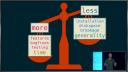
So what should we do instead? So I think really when you're deciding whether or not to have a dependency in your package or to use a certain package because it has so many dependencies, you need to weigh some things. And this, how this scale works really depends on your personal use case and the users of your code. So if you're, so if you have more dependencies, you gain more features, more bug fixes, more testing of those features because other users are using your dependencies, but you, but if you don't, if you have fewer dependencies, you instead have less installation time, less, you use less disk space, you potentially have less breakage in your code because you don't depend on an external package. So having more dependencies gives you more developer time, so it takes you less, you as the developer less time, but you lose generality.
So really I think you need to consider your users as like the, as when you're making these decisions. If the package you're writing or the project you're using is really meant for other package developers to include your package in theirs, the installation time becomes more of a factor. So it's more costly if other packages are trying to depend on your package. And in addition, smaller, more focused packages are easier to include and depend on than larger, broader packages. And in this context, I think stability is often more important than features. It's more important if the package is stable over time than if it continually gains new additional features.
In contrast, if your users are primarily other data scientists or statisticians that are loading your package in R scripts, the installation time in that case is very cheap. So those people are probably going to install your package once or just a handful of times. And often if you're depending on other packages that are widely, that are highly used in the community, those packages often are already installed already. So the users don't even have to install those for the most time, for the most part. And in this case, in this context, really the features are the most important thing you need to worry about. So if your code is really meant more in this context, you're more likely to include additional dependencies.
Avoiding overconfidence when removing dependencies
In addition, once you sort of decide that you want to replace a given dependency, it's important to take into account this phenomenon of illusionary superiority. So people just as a whole, and I include myself in this, have a very hard time rating themselves against the rest of the population. So some examples are like in teaching ability, there was a survey done in the University of Nebraska Lincoln faculty, and they were supposed to rate their teaching ability versus the rest of the faculty. And in this survey, 68% of them responded that they were in the top 25% of the faculty. So in another example, in driving skill, so 93% of U.S. respondents to the survey, and 69% of Swedish respondents put them in the top 50% of drivers. So clearly a lot of people are vastly overrating their own abilities.
So how this relates to this issue is don't, just because you think you might be good at programming and that the problem maybe doesn't seem that hard, you're very likely to overrate the difficulty of the problem and sort of your own ability to reproduce the results of the dependency you're trying to replace. So really avoid, so some pitfalls of removing dependencies, avoid this overestimation of abilities, and people often underestimate how easy it is to introduce new bugs. I guess I've been programming long enough that I just assume I will be introducing new bugs when I'm rewriting code. It's just like you do your best to try to avoid it, but it just seems like it's inevitable, it always happens. In addition, a benefit of using widely used packages is not that necessarily those authors of those packages are better or worse at programming than you might be, but because they're widely used, they have a huge user base, and those users are uncovering bugs which can then be fixed. So really using widely used packages is a great way to sort of have free tests in your package. And really the conclusion of all of this is that less is not always more when it comes to dependencies.
really using widely used packages is a great way to sort of have free tests in your package. And really the conclusion of all of this is that less is not always more when it comes to dependencies.
The it depends package
So when you've, I guess, decided that your package or project has too many dependencies and you're trying to remove it, how do you know what dependencies you want to remove? In this, I think it's really important not to just trust your gut in this. I think you need to quantify sort of the weight of each dependency in order to figure out which one you should actually remove. And how do you do that? So I have this package on GitHub, it depends, that is really aimed to make it to be a toolbox for making these types of decisions.
So what does this package do? So it does a few things. So first, it lets you assess the usage of all the dependencies in your package or project. Second, it lets you measure each of those dependencies, measure the weights of these dependencies against some of the things that I showed you earlier. In addition, it lets you visualize all of your dependencies so you can easily see which ones are taking the majority of the time, like installation time or binary size. And finally, it has tools to locate and assist removing dependencies.
So first, the dep uses proj and dep uses package functions lets you determine how you're using dependencies in your project or package. So you basically call this and it returns a table of all of the calls for each package, for each dependency package in your project. And then I can just count them with dplyr and get a nice count of for each package, how many function calls have I used from that package. So we're using the base package in this project a bunch. The na row here is functions that I've declared inside my project. And then we're using purr and glue a bunch as well. Maybe I want to see which functions from those dependency packages I'm using the most. So this is doing some other dplyr manipulations to show you that. And this is basically showing the top function for each of the dependency packages.
So that was for projects. Now we can do the same thing for a package. So this is using dep usage package on the DevTools package to count which dependencies I'm using within DevTools. So here we have 3,000 function calls from the base package, 362 function calls from functions defined in the DevTools package itself, and then we're using get to our use this package load. So we can easily see which dependencies we're using the most. And so this is very useful to see which dependencies maybe we're not using very much and would be easier to remove.
So once you've sort of whittled down your full list of dependencies and targeted those you might want to remove, how do you figure out which ones weigh more or less? We can use the depth weight function to do this. So this returns a table of 25 different— so it's 25 columns, so 24 different aspects that dependencies can vary on. So here I'm weighing two packages, dplyr and datatable, and we're getting a large result of different weights. And we'll go through some of these. They don't all fit on one slide, obviously.
So some examples of things that return. So num user is the number of user dependencies. So these are dependencies that a user would install. A num dev is the number of development dependencies. So a developer of these packages would install these, but users typically wouldn't. The binary self and binary user and binary dev is the binary sizes for the self, the user dependencies and the development dependencies. And then the install columns are the mean time— or the median time to install each of those packages. And all of the— the user and dev is all of the dependency packages. So those are the times to— that CRAN did to install those dependencies. So this makes it very easy to tell which packages have more dependencies and heavier weight dependencies.
Some other things that the depth weight function returns is the number of functions in the package. So this gives you an idea of sort of the breadth of the package. And also if you contrast the number of functions in the package with the number of functions you're using in your package, you get some sense of sort of how much of the dependency package you're actually using. If a dependency package is very big and you're only using a small subset of that package, maybe you can— it's easier to remove that dependency. Other things that this returns is the number of weekly downloads. So that's what's in the download column. The time of the first CRAN release and the latest CRAN release and the number of releases in the last 52 weeks. So these all give you some idea of sort of the age and maturity of the package as well as sort of how often it's being updated on CRAN. It also returns some information if the package is on GitHub. So this is returning the number of open issues in each package, the number of stars, forks, and when it was last updated. So again, this gives you some idea of sort of the development speed of the package. And you can see both of these packages are widely used and have been updated very frequently.
Visualizing and removing dependencies
So once you've done this weighting, often it's useful to visualize all of the dependencies of your package or project against each other and see which dependencies are really taking up the bulk of the time. So this plot is showing the dependencies of the dplyr package. And the labels are probably too small to read. So the left side, the left facet is, yes, left facet is showing the user dependencies. So these are the dependencies that a user would typically install. The right one is showing the development dependencies. And if we just focus on the user dependencies, you can see this is installation time. So the installing dplyr, building dplyr itself is the thing that takes the vast majority of the installation time for dplyr. If we change this to looking at the binary size, the picture kind of changes. So now the bh package is actually the bulk of the time installing the binary. The binary of that package is much bigger than dplyr itself.
So now we've sort of targeted, using these tools, we can kind of target which dependencies might be the most beneficial to remove. And so once we've decided to do this, how do you actually remove a dependency? So first, I think the most important thing is to write extensive, like, much, many more tests than you would normally write with the dependency in place in your package to make sure you're not introducing any new bugs. You will probably introduce new bugs anyway, but really, like, try to write tons of tests to avoid this. And then only then will then try to replace the dependency.
And the it depends package gives you a nice tool to help find all of the uses of the package in depth locate. So if you use this, I'm now trying to locate all of the per dependencies in this tidyverse dashboard project. And if you run this on the normal R console, you get a nice printout of every location of a call to the per package. So this makes it very easy to find and remove them. And if you then use this inside the RStudio IDE, it takes advantage of the marker pane in the IDE, and you get very nice output. And you can actually double click on each of these lines in the marker pane, and the IDE will take you directly to that line. So it makes it very easy to find and remove a given dependency.
So in conclusion, this it depends package is really a tool box to let you find all measure the usage of your dependency, weigh each of those dependencies, plot them, and then locate them. And the sort of big, big point takeaways to this is don't treat dependencies as equivalent. You really have to measure and balance and sort of you and weigh the pros and cons of having a dependency. Really beware your own overconfidence in your ability to replace a dependency. And less in the sort of overall conclusion is less is not always more. So thank you, everyone.
Thank you very much, Jim. Thank you for that introduction. We don't really have time for questions. People probably want to start changing rooms. But if you have quick questions, one sentence with a question mark. Jim, would this also work or will it work at some point in the Shiny app? Yes. So the project versions should work like the project versions of all of those examples should work exactly the same in the Shiny app as they would a regular R project. So it's really just looking at any of the R files under that directory. So that should work just fine in the Shiny app. Yeah. Thanks.



