


The Tidyverse and RStudio Connect | RStudio Webinar - 2017
This is a recording of an RStudio webinar. You can subscribe to receive invitations to future webinars at https://www.rstudio.com/resources/webinars/ . We try to host a couple each month with the goal of furthering the R community's understanding of R and RStudio's capabilities. We are always interested in receiving feedback, so please don't hesitate to comment or reach out with a personal message
image: thumbnail.jpg
Transcript#
This transcript was generated automatically and may contain errors.
Today, we want to talk about self-service analytics and our new product, RStudio Connect that we released. We did a soft launch earlier this year. You can download an evaluation at any time. Hopefully some people that are in attendance today have seen it.
We want to give you an explanation of why RStudio Connect and the value we think it adds to organizations and how to get the most out of it. I will walk through a few background slides and talk about our product stack a little bit. If you are familiar with RStudio IDE, we will talk about the packages a little bit. They tie all of these things together, specifically Shiny and RMarkdown and also the tidyverse and our new product, RStudio Connect.
Introducing the tidyverse
First I want to cover the tidyverse. If you have not seen the tidyverse, it is a collection of R packages that share common philosophies and are designed to work together. These are a lot of packages that Hadley's team has put together or worked on. You can read about them in R for Data Science, which is a book that Hadley and Garrett wrote. It is free. It is online or you can buy it through a publisher if you would like.
The tidyverse can be installed and loaded very easily just by including tidyverse. What happens is it will load up all of these packages that you see on your screen. The idea of the tidyverse is that you will be using these to create analyses and visualizations and do your work in a very fluid way.
The analytics workflow
That is what I want to talk about next, this process of doing analytics. Most people have some set of data that they start with and they import that data and clean it up and try to understand their data. They go through a cycle of transforming, visualizing, and modeling their data. When you are done with that, you want to communicate what you learned to other people. You want to share the insights and understandings with people. That often involves publishing either some sort of documentation or visualization or application.
This workflow here, this process workflow of programming and data science, is the way we conceptualize doing data science with R. This is what the R for Data Science book is a lot of what it is about, is managing this workflow and providing the tools to do this effectively. Today, we are going to be talking about this last part of the workflow, which is communicate. That is what we want to talk to you today about, is communicate.
Content creators and consumers
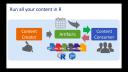
Communicating involves two parties. The first party is the content creator. Who is the content creator? That is the data scientists, the domain experts, or the app developers. Their job is to understand, measure, predict, and optimize systems and analyses on top of their data. The output of that understanding is typically artifacts, documents, applications, or plots or whatnot.
Then you have the content consumers. These are the people that are the managers, the peers, maybe other students. These people may or may not understand R or have a great background in analytics. Their job is to take what you learn, what you do, and make decisions and take actions and see results. These content consumers are extremely important in taking advantage of the artifacts that are being created.
A typical process workflow, and this is what I am very familiar with, I am an analyst by training. I have used R for a long time. I go into R and create my analysis. When I am done, I make a report and I send it on to the consumers by email or SharePoint or put it on the file share somewhere. That is a very traditional way of sharing your analysis.
What happens when you do that, invariably, somebody asks a question. They say, there is an error here, or I want to see more, or I want to go deeper. The content creator goes back to work, opens up their code, and creates a new artifact. That artifact is then pushed back to the content consumers and the cycle repeats. This can be a time-consuming cycle. The question is, can we do better, can we be more efficient in the way that this cycle is managed?
The case for self-service analytics
Yes, there are ways to make this better. One of those ways is to create something that might be self-service. Wouldn't it be great if instead of the content consumer asking the content creator a question, if they could go back to the artifact and ask that question and get the answer from the artifact itself?
Wouldn't it also be great if you could schedule and distribute these reports without having to do it in a manual process? If you have a dashboard that you need updated every week, maybe the system can handle that. If you want to distribute one version of the report to one group and another version of the report to another group, maybe the system can handle that. Wouldn't it be great if all of this content just ran naturally and natively in R? That's the language that we know, so we want to be able to make sure that the system can run all of this natively in R, can serve up Shiny apps and R Markdown documents.
And finally, wouldn't it be great if we can just pass much more of the control that we typically maintain in our daily work to the content consumers and allow those content consumers to have some of that control to get the answers that they need to run R, even if they don't know how to use R, to schedule the reports and take action on the analyses on their own?
And finally, wouldn't it be great if we can just pass much more of the control that we typically maintain in our daily work to the content consumers and allow those content consumers to have some of that control to get the answers that they need to run R, even if they don't know how to use R, to schedule the reports and take action on the analyses on their own?
So that's what RStudio Connect is designed to handle. That's what we're going to be talking about next. So my colleague Sean is going to talk a little bit about these different types of artifacts. The first one is going to be this static document, right, where you just have a very basic R Markdown document. And then he's going to talk about parameterized documents and how powerful that those are. And then he's finally going to talk about application development, hosting applications in a way that consumers can take control of those applications.
So I don't want to take any more time away from the demos. Let's dive in and see what we have. And I will pass the baton over to Sean then.
Demo introduction
So thanks for that introduction, Nathan. What we're going to be talking about today, just as Nathan said, is how to get that control over to the end users and make your lives as data scientists a bit easier. And we're going to be doing that with content, and content has to have a data source. So our data source today is going to be this Star Wars API, or SWAPI for short. It's a great data set. It's a lot of fun if you're a Star Wars fan like me. It's a fitting. The latest trailer just came out. And this data set contains all kinds of crazy information on everything from characters and films to physical characteristics of home planets. And so we'll be digging into that a little bit today.
So I'm going to start inside of RStudio just to help us get our bearings a little bit. I'm using a flavor of RStudio called RStudio Server Pro. So you can see I've accessed RStudio through a web browser, which might be new to some of you. But otherwise, the ID is exactly the same. And everything that I'm going to show you today, you'll be able to do inside of RStudio Open Source Server, RStudio Server Pro, or just on RStudio Desktop, which is most likely what you guys are using.
All right. So as Nathan mentioned, one of the most common forms of communication and communicating the results of analysis is just with a static piece of content. And one of the, again, most popular pieces of static content are just plots and visualizations. So that's what we're going to start off with today. So Nathan mentioned the tidyverse. I'm going to use the tidyverse throughout the demos. And all these demos are going to be online afterwards. So you can play around with the code yourself. When you run this command, library tidyverse, it pulls in a whole bunch of those packages.


