


Extracting Data From the Web: Part 1 | RStudio Webinar - 2016
This is a recording of an RStudio webinar. You can subscribe to receive invitations to future webinars at https://www.rstudio.com/resources/web... . We try to host a couple each month with the goal of furthering the R community's understanding of R and RStudio's capabilities. We are always interested in receiving feedback, so please don't hesitate to comment or reach out with a personal message
image: thumbnail.jpg
Transcript#
This transcript was generated automatically and may contain errors.
This is the first in a two-part series of webinars I'm going to present on extracting data from the web. And what we're going to look at today is how to get data that's been already packaged for you in a web API. A lot of times when people want to share their data through the web, they go through the trouble to make an API, which makes it easier for you to get that data.
On November 30th, we'll follow up this with a web scraping webinar, which will show you how to just go out and scrape the data that you want right off the web pages when it's not been prepackaged into an API.
The topic that we're going to cover today touches on something very deep, and that is actually the topic of web APIs and web development. And I'm not going to go so deep into that. That's not my expertise. And what I will be teaching you is a package called HTTR, which is an R package that allows you to use HTTP web APIs with R. The HTTR package is actually very simple to use.
So if you are a web developer and you are familiar with HTTP, I suggest that maybe you just look at the vignette, the quick start vignette for HTTR. It's about 1,500 words, probably take you less than 10 minutes to read, which is shorter than this webinar. And I put the link up here right now in case you're watching this in the future right now and you think this might be a better way for you to ramp up.
Because what I'm going to do is focus on what HTTP is, what web APIs are. And I'm going to assume that the people who need this webinar are people who have a background like me, where you're a data scientist or statistician, you've identified the web as a great place to collect data, but you don't have that background in APIs or web development. So you don't necessarily have the context to use the HTTR package, which like I said is a fairly easy package, as you'll see when we get to that.
So before we start explaining what web APIs are and whatnot, I do want to acknowledge that these two webinars both come from a tutorial that I taught with Scott Chamberlain and Karthik Graham at the last UseR! conference. Now the webinars are more concise and self-contained, there's no exercises for you to do. So the contents of these webinars we will put on the RStudio webinar GitHub, like we always do. But if you wanted access to the original content, it is available through the ROpenSci GitHub repository, which is the link right here.
What is an API?
What is an API in general? You can think of an API as a set of instructions for how a program should interact with a piece of software. So if you create a piece of software that does something useful and you think someone who's writing a program somewhere else might want to use your software, you would set up an API which tells that developer how their program should send requests or interact with your piece of software.
And an API can be an interface to a database, to a computer's operating system, to a software package that does something, or commonly to web applications. And we're going to focus on this last case today. We're going to focus on how you can use an API to a web data source to collect data into R.
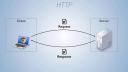
And if you wanted to visualize, you know, how APIs work, you could imagine or you could think of something that you do every day that involves an API in the background, and that's browsing the Internet. When you open a web page on your computer, the pictures that you see on the web page, the text, the links, all that exists somewhere on a server on the other side of the Internet. And your web browser on your computer locates that server that's storing all this information. It sends a request to the server using the server's web API, saying, please give me the pictures so I can display them on my user's screen, and here she could see what's on your web page.
And then the server sends a response back that hopefully contains the pictures and the text, everything the web browser needs to build that web page locally for you to look at. Or the server might send back some sort of error message saying, I can't do that for whatever reason. The instructions, the requests that your web browser sends to the server, are formatted according to the API that that server uses, or that that program uses.
So when you write a piece of software, like I guess Tim Berners-Lee wrote the Internet, you can decide how you want this all to work. And then anyone who wants to work with that software should follow your rules, otherwise your software's not going to respond the way that they want. So when your web browser connects to a web server, there's a specific way of doing that that your web browser uses, and that is with an API protocol called HTTP. And that's what we're going to look at here today.
HTTP and URLs
So HTTP is standard for all sorts of web interfaces. I mentioned before my background's not in web development. I imagine there are some exotic places where you might find something other than HTTP, experimental locations, but really I don't know of any. So I think HTTP is pretty standard. What we're going to try to do today is use the HTTR package to equip R to behave like a web browser, in that it can fetch resources from a web server straight into R. Those resources could be things you see on a web page like images and text, or they could be actual data that's been saved on the Internet for you to download.
So let's look at HTTP, the protocol that we'll use in our web APIs. It stands for Hypertext Transfer Protocol. The Internet is basically built on hypertext, which is text that's linked to other pieces of text and so on. And HTTP itself revolves around the idea of URLs, which is another acronym for Uniform Resource Locator. And a URL is what you know as a web address, it's what you type into your web browsers. And you can think of a URL more generally as a file path to a resource on the Internet.
Just like a file path on your computer, there are different parts to this URL that directs your computer to the actual resource, the server to the actual resource. This is how you identify the resources that you want to request or that you want to alter or delete or whatever you want to do through the API.
And just going back to this, there are different parts of this URL that I've put here, and many of them are optional. You very often won't have query parameters or an ID or whatnot, but all these things can work together to form a URL. Or you might be able to get resources as simple as www.host.com.
The way HTTP is organized is you make requests, the client makes requests that are sent to the server, and then the server responds with responses. And both the request message and the response message are basically plain text files, and they share the same structure. So plain text is really easy to pass over the Internet or over any network. And so HTTP is taking advantage of that.
If you wanted to look at an HTTP message that is sent, whether it's a response or a request, it's going to have the same three-part structure. There's going to be an initial line that contains very important information. What's in that line will depend on whether or not this is a request or a response. We'll look at those separately in a moment. There's going to be, or there can be, a set of optional headers, which are just key value pairs separated by a colon. Those can contain useful information. And then also optionally, there may be a message body at the end of the message, separated from the beginning by a blank line. And that message body is where contents would be if the message contains an image or a data set or whatnot.
HTTP requests and verbs
So let's look at a sample request. You can't get a response from a server until you send a request, so you need to learn how to send a request before you learn how to interpret a response. And this would be a real HTTP request going out to the webinars page of RStudio.com, which is somewhere you've probably visited if you managed to wind up here, and it's just asking for the information that a web browser would need to display this webpage on your computer.
If we look at it, we can see it has that three-part structure, although since this request is not really sending information for the server to use, it's just saying, please server, give me something back. There's no body. There's no content to it. It's just an initial line and some headers with some metadata.
And this initial line is broken into three parts, and this is how the initial line of any HTTP request will be organized. The first line will be broken into three parts, each separated by a space, and the last part for a request is the most trivial. It's the version of HTTP that the request is using. We're not going to have to pay attention to that today.
Next part is the URL path to the resource that the message is pertaining to, and you'll notice that this isn't a complete URL path, but your computer will have already established a connection through a port to the host, which is www.rstudio.com, so the host knows what it is. The host needs to know where in all of its files is the resource you want to know about, and that's the remaining part of the URL. So here, resources slash webinars takes you to the webinars page of rstudio.com.
And then the first part of the first line is probably the most important part of your request, and that is an HTTP verb that tells the server what you want to do. There are a collection, a small collection of verbs that you can use with HTTP, but the most important ones are probably the four that I'm going to list here. We're using a get verb in that sample, and get is the verb you use when you want to retrieve a resource that's specified by a URL. You send a get request to the server, and the server knows that it should send you back what you're asking for, or tell you that you can't have it, it doesn't exist, you know, something like that.
You can also send a post request, which creates the resource out of URL. So when you send a post request to a server, you normally attach some data to it, the server gets this, and then it uses that data to build a new resource at that URL, which will then exist and other people can get it and use it. You can use a put request, which is similar to post, but it works with resources that already exist. You use a put to update that resource with data that you store in the contents of your message. And then you can also send a delete request, which would delete a resource that exists on that server at that URL.
So like I said, there's other verbs, but these are the big four, the most important ones. And this is really the place where you as an R developer need to start paying attention. So the information up to here was all contextual, it's all about how the web is created, but these verbs are things that you will use from inside of R.
Using the HTTR package
So let's start doing that. The package that will use an R to send HTTP requests and receive responses is called HTTR. It's like HTTP, but it ends with an R. To use it, you can install it from CRAN like any package and then load it with library. And to create a request with HTTR, you would use a function that matches one of the verb names. Notice these names are all capitalized, so if you wanted to send a get request, you would use the get function, which comes in HTTR, and it's capital G-E-T.
What you pass to get is the complete URL of the resource you want to get. There's also a function, for example, called post, and then you pass a complete URL where you want to post the new data to, and so on. We saw in our HTTP file that the actual HTTP request sort of divides up this URL, but you as an R user don't have to worry about that. Get is an R function, and it's going to do some preprocessing in the background for you. All get needs is the complete URL, and it'll take care of the rest there.
And then notice I'm saving something from this function. Once get sends the request, in this case over the internet, so you don't want to be connected to the internet, but the server it accesses is going to send back a response, and get will return that response as the output of the function. So if I want to use that response later, I'm going to save it, and here I'm going to save it to the object R.
I'm accessing here a website called httpbin.org, and that's on purpose. This is a website that was set up as a learning age for HTTP, and basically when you access something there, it just sends back the thing that you sent to it. So if I'm sending a get message to httpbin.org.get, httpbin is going to take that message, quickly recompile it into a response, and send it back to me so I can kind of see what's going on behind the scenes.
If you want to add headers into the HTTP message request that you're sending over, you could do that by adding the add headers function as an argument, an unnamed argument, inside of your verb function. So here I'm adding it inside the get function. Pass to add headers a set of named arguments that you want to become your headers. So I'm just making up a stupid header that no server would know what to do with, but I'm saying add this header, name equals Garrett, that's my name, and what get and add headers will do in the background. So when it assembles your message, your message will look like this.
Here's the first line we see, our get, that's the verb. The part of the URL that is needed to go from the host to the resource, which is just slash get, and then the protocol we're using, which is HTTP 1.1. And then there's a header, and it's the header I added, name colon get. The name of the argument that you select will be the key value of that key value pair, and then what you set that name to will be the value of the key value pair.
Well, the third part of any HTTP message is a body, and if you want to add a body to your message, you could do that with the body argument. So normally when you send a get message, you don't need to add a body. You're asking the server to send you data, so you sending data to the server is kind of unnecessary, and it wouldn't be used if it arrived. So I'm going to use the post verb here, so the post function creates a post request, and post is the verb that you use to create a new resource on the server. That new resource that you want to create, you need to pass to the server in the body of your function, of your request.
So here I've saved a list with three elements named A, B, and C, two body. I saved my URL separately, but I'm passing it into post. There's my URL. Then I'm sending the body argument equal to this list that I created, and saying I want this resource to exist on the server, and I want people to be able to access it through that URL that I just made. And then you could choose how to encode that data that you're sending along. So if you're working in R, the data that you put together is probably going to be a list, which is an R object that a web API won't know what to do with. So the header is going to transform that data into something that's more commonly used by web APIs, and you can choose with the encode argument how you want to do that. To learn more about encodes, look at that whole page for post, but basically you can encode as a form, as multi-type data, as raw data, which would just be binary data, or as JSON.
JSON and the jsonlite package
So you'll be familiar with it. It's another acronym. It stands for JavaScript Object Notation, and it is also a type of key value pairs organized hierarchically into a group. It's becoming the standard data format for web APIs. There are other formats out there like XML and so on, but you will probably see JSON, and as you start working with web data and go a little further, you will encounter it.
But I wanted you to just be aware of what's there in terms of JSON, and also a tool for working with JSON. There is an R package called JSON Lite, which is a very simple package. I mean, it's only a handful of functions, but it's for working with JSON data in R. The two primary functions are toJSON and fromJSON. toJSON takes an RObject, it could be a list or a data frame, and turns it into JSON. FromJSON takes JSON, saved as a character string, and turns it into an R list. Now I say this is a tangent, because the HTTR package is actually pretty good at isolating you from having to convert JSON. It's doing that in the background, and it's doing it with the JSON Lite package. But if you ever want to do it manually, JSON Lite would be a good place to start.
Handling HTTP responses
There's one more argument that you would use with the request function that's very helpful, and that's this verbose function. If you pass verbose as a function with parentheses behind it, so called function, into the get function, and that's an argument, then get function will do what it's going to do anyways, but it will print out the actual HTTP that it's sending as a request. It'll also print out the response it gets. I didn't paste that into the slide here. So here you don't have to take my word for it that these things are making the messages I'm showing you on the screen. This is the actual output. And here we can see that get is actually adding more headers than I've been including in my samples, and this is sort of what you could consider boilerplate for HTTP.
So now you know how to create a response to send out to a server through a URL, or a request, I should say. Let's look at what you will get back. When you send your request, the server will process it, and it will send back a response, which is also a text file. It also has three parts, the same three parts, and the first line of it is also probably the most important line. So here's a sample response. Here I am dividing it up into the first line, the headers, and the body.
If you look at the first line, the parts are kind of reversed. The first part here is the HTTP version, which, again, we don't really have to pay attention to today. The second part is a status code, which tells you whether your request succeeded or not. There are a variety of different status codes, but here 200 means that the request did succeed. This is a status code you always hope to see, it means success. And then the last part is sort of an English explanation of that status code. So every status code is a number, a three-digit number, and the English explanation helps to understand what that number means.
You've probably seen status codes before just in daily surfing the web. Oftentimes, a status code will be put into the webpage you're seeing so you can understand what goes on. So for example, if you go to a place in RStudio.com that doesn't exist, you will get a 404 status code, or your web browser will receive that back from the server, and 404 means could not be found. And so here, the design of the RStudio website puts that 404 up there and says, oops, this page cannot be found. So if you've seen this before or other errors like 400, 500, that's just your web browser using the status code it got back from the server to try to explain why what you expected to happen didn't happen.
There are a whole bunch of status codes. There's so many things that could go wrong. There's so many things that someone might want to talk or say through their API, and if you want to look up any particular status code, there's a very cute way to do so at http.cat. It's a little confusing. That HTTP is the start of the web address. It's not the beginning of the URL, so you'll have to write HTTP twice. But it lists all of the status codes in a cute, memorable way.
So let's look at the initial request we made with Git. I saved it as R. If you want to see what we got back when Git saves its response into R, you just type R, and this is what R will show you. I've truncated a little bit at the end. It shows us that this is a response, it's a response from this URL. We got it at this date and this time, the status was 200, the content type sent back was JSON, the size was this size, and we actually see the body down here. This is some JSON that was sent back. So we were asking for something, and what we got back was this JSON.
This isn't a direct HTTP message. It's an HTTP message that has been parsed into an R object, because we're now working in R, and in the background, HTTR's doing some work for us. In fact, you could think of this object that's been saved to R as like a model object in R. When you create a model, you get all sorts of information inside an object, and R doesn't necessarily know which part of that you want to see at any given time, so it just sort of saves it there, and it gives a slim display when you look at the object, but if you want the rest of the information, you'd use a helper function. HTTR comes with helper functions that allow you to access information that's in this response object.
One of the first helper functions, or one of the first pieces of information that you'll want to get is the status code. This is what lets you know, or let your program know, whether it worked. You can access the number in the status code very simply with $status underscore code. So here, the R worked. We got our 200. That means it worked. Or you could get a more verbose, easy, or human understandable status message using the helper function HTTP underscore status. It prints out this list that has, you know, different components, but here we see the final one. This was successful. We got the 200 status code, and the English equivalent of 200 is okay.
Now, when you're working with APIs, the status code really does matter. If you're not looking with your own eyes at the message to see if it worked or not, you will want to program defensively and have your program check to see whether the status worked or not. So it can then, you know, raise an error or a warning, and HTTR has two functions that can help you do that. Warn for status will check the object to see if, you know, the status code was not 200, and if so, it will raise a warning to say, you know, this was the message, and then stop for status does almost equal, but actually stops with an error.
The other thing that, if you're in the defensive mindset, you should keep in mind is there's no guarantee that these status codes are actually the correct code that comes back. You're kind of working here with someone who developed, you know, their server program on their side, and you're kind of relying on their good work, and sometimes that work might be a little bit sloppy. So if your program really depends on a certain type of data coming back or something, don't just rely on the status code to tell you that that happened, you might also actually look at the data and make sure it's that type before you let your program go on.
After the status code, which is basically the only form of information, the initial line of response, you might want to access the headers, which contain metadata from the response, and you could do that with the headers helper function. It basically returns a named list of all the headers. The key values are the names, and the values are the elements in this list, and then you could access any particular one using the dollar sign syntax that you would with a list. So here I'm accessing the server header, and its value was NGINX.
Within the content, if you are collecting data, this is where the data will be. It will be in the content, which is also the body of your message. You could access the content using the list syntax with dollar sign content, and what you'll get is this. This is, you know, the raw bytes that were sent back through your HTTP message. As an R user, that's probably not what you want to work with at the end of the day. So there's a helper function that can help you extract and then parse those raw bytes back into data you can access easily.
And that helper function is content, so I'm using content on the R object, and then you can specify the content, what format you want that content back in. If you want those raw bytes, you can use raw, and you get the same raw bytes as using the dollar sign. But if you prefer the content as text, you can use text, and then a header will parse that raw data into text for you. This is what we get here, and then you could also just ask header to parse it, and parse will look at the header that describes the content that's in the body. It will recognize that content if it's one of these familiar contents over here, which are some of the most popular, and then it will convert the raw bytes into that content into an R list for you to use.
This content was JSON, and we get it back as a named list, and then you can use your R mechanics for working with lists to access the different parts of the content. This content here, by the way, just built a webpage, so this is basically a JSON format for a webpage.
So it can then, you know, raise an error or a warning, and HTTR has two functions that can help you do that. Warn for status will check the object to see if, you know, the status code was not 200, and if so, it will raise a warning to say, you know, this was the message, and then stop for status does almost equal, but actually stops with an error.
Putting it all together
So that is all the basics of using HTTR. It might have seemed really simple, but really all you are doing is making requests to a server, and then collecting responses from the server. The magic happens with what you do with those requests and those responses.
Here I focus on getting information back from the server, because normally I think the use case for us will be there's data on the server to that particular URL, and we just want to get it so we can access it, manipulate it. However, you could use this technology to manage a webpage from R, and you could post new pages with post, you could update pages with put, and you could delete pages with delete. And then there are other HTTP verbs that have their equivalent HTTR function in the HTTR package, and you could look at the help page for that package to find them all.
Live demo: OMDB API
Let's move out of the slides and into RStudio and take a look at how we might use this to do a simple data collection task. I'm going to use a website called OMDB API. If you've ever been to IMDB, the Internet Movie Database, it contains information about movies and when they came out, who the actors were, who the characters were, what the plot was. Well, OMDB contains that same sort of information, but it's an open movie database. It is an API on the web with data about movies that exists for people to connect to to collect that data and then use it.
This is a very nice API. They want to be as helpful as possible, so the front page actually talks about how you can use this API and some of its unique features to get stuff. And then down here, we could just type in Frozen. If we wanted, for example, to collect a movie Frozen, search for it, it finds a movie Frozen and says, look, if you want to request the data I have about the movie Frozen, it's all stored at this URL here. So I'm going to copy that to use. I'm going to go to RStudio.
I have a script here that already has this because I copied it earlier, but that's just the URL I got from OMDB API. I'm loading the HTTR package, I'm saving this URL, and now I'm going to use the Git command. I'm going to use the Git command to collect the resources at the URL.
Now what I've saved in Frozen is this response I got back from this Git request. I just got it, stats to unmoved, that's good. That means this worked. I got some JSON data. That's about one kilobyte of data. If I wanted to look on some, I could, there's quite a bit in here. This is the sort of stuff that you find on IMDB, that's what OMDB recreates.
Let's save this to details, and if I was particularly interested in, I could then just look it up in this R list. It's 2013. I can use an R list, I can use an R as I like. As long as I know what URLs to look for, at least the structure of the URLs, I can implement all this into a program, maybe have a for loop or a map function, iterate over a set of URLs, collect all their data, extract the year component, and then I could have a set of years for different movies, and so on. This is how you use HTTR to access data that's been provided over a web API.
Q&A
All right, so that's about half an hour, and that was all the material I've prepared about HTTR, so now let's take some questions. We have some time for that.
Can I give another example? I could if I knew another URL. It really is this simple. I mean, basically I'm just teaching you the syntax for one function and how to interpret the results, and you could apply it to the other functions. Something that might be a little elucidating is if we actually do look at the help for package HTTR, so this opens up a list of all the help pages in this package, and one neat thing about seeing this list is you kind of get a feel for what functions are in the package because every function has a help page, at least in a well-documented package, and here we could see what's there, but the capital function names are the different verbs you can use, you know, patch, post, put, retry, and I guess this is just a generic help page for arbitrary verb.
Yes, by checksum get, method can be used with a query argument. By secular, I don't know if this was in response to a conversation you had, but yes, there are other arguments to all of these functions, so if you want to learn a more complete way of using everything, depending on what your needs are, then the easiest way would be to look up the HTTR package on CRAN, and this view that CRAN provides will show you, for any package, all the vignettes that they have, so if you want to get started with HTTR, here's the quick start vignette that goes into it a little more deeply, and then here's some best practices for writing APIs yourself. These were both written by Hadley Wickham, the package's author, and they contain much more information than I plan to go into today.
But if you want data on hundreds of movies at once by Steven Spitz, Steven, this would be a case where you have to assemble the get function components into a for loop, or what I would suggest is a map function from the per package, which is a little more efficient, but you have to write a program or a script that will tell R to send a request for every movie, and then tell R what to do with response that gets back for every movie. That shouldn't take too much time, and it's completely possible to do.
And then Peter's question is similar, how to instruct R to get the full list of movies. Again, you would have to know what the exhaustive list was. If you had that list of movies, then it'd be very easy to iterate over those movies, or if you had some sense of how OMDB structures its URLs, so you could programmatically change the components until you're satisfied you've gone through them all, then you could do that too. OMDB, I haven't worked with it too much, because I haven't done anything with movie database data that I'd want to spend time on, but they might actually, giving the care that they've taken to create their database, make it easy to access the entire list.
We use this for a website like Yelp. Let's go determine whether or not you could use this technology for a website. What determines whether or not you could use this technology for a website will depend on whether the website contains an API for accessing the data. Not every website does, but many websites do. I don't know if Yelp has an API, but if I wanted to find out, I would start by Googling it, and it looks like it does. So yes, you could use this, and then if I was going to do that, I'd read the documentation for the API for Yelp. Web APIs that you find will be based on HTTP, the GET, the POST, those verbs, but they might have deeper features that you could take advantage of that their documentation will tell you how to do. And normally those features you take advantage of by adding things to the URL that you pass to your request.
How do you learn what parameters a web API will accept by serving? Well, this is a good case for Yelp. When someone creates an API for someone else to use, if they add any features to it, they need to document it themselves. The creator of the API, so the Yelp developers here, they have complete control of what they want to put into the API, what they want to make available, and there's no real standard other than using HTTP that they'll feel obliged to stick to. So there's no universal rule. You have to learn about the API you're trying to access.
What package could we use to take the GET input and convert it into a data frame? That's just function arguments, but I suspect, Jordan, that you're talking about the response that you get back from GET. And the package that I would use to do that is most likely JSON-lite. It depends on if the content of that body actually comes back as JSON, but that would be the most common way for the data to come back. And then with the JSON-lite package, you could use fromJSON to turn that right into a list, which you can then make a data frame with as.data.frame. If the content comes back as something different, it's either going to be text, which you'll just have to use text manipulation tools. There probably is a package. I haven't worked with that, but if it's not JSON or text, it'll be XML, and then you can use the XML package, or even better, the XML2 package, which serves the same role as JSON-lite does for JSON. It makes it easy to work with XML data in R by changing the XML data format into R data formats, like lists and data frames.
Do you ever need a special code to access an API, Steven Spitz? Yes, you almost certainly do. Can you use OAuth 2.0 authentication with the HTTR package request? So yes, a lot of APIs do actually want to protect their data, or at least know who you are if you're coming to use the data, so they require some sort of authentication. You can use authentication with HTTR package. Here we're going beyond my abilities as a statistician to do things, but if you want to set HTTP authentication, I'm in the help page for Git. It has a link right here to authenticate, which is the helper function in HTTR that will help you do that, and then there's some examples down here about how you could go about that. So if you wanted to send a Git request to, for example, HTTP bin, which we were using earlier, you could send it right to that URL. But if you need to authenticate with the user and the password, you would add authenticate to the request, and it would add your user and password to the HTTP message that it sends.
If my job is a firewall, how do I ask IT to let me through so I can get data? If you have a firewall, that's obviously a difficulty. This is a place where I'm going to have to punt. I myself would have to ask IT, and I would be very dependent on what they tell me back. So the only thing I can tell you is that you should ask IT, and they, doing what IT does on a day-to-day basis, should be familiar with how to give you permission to go through a firewall.
How do you make sure you don't overload the web server with requests? Well, if you are automating your work with a map function or a for loop, there will be a lot of requests, and depending on what sort of defensive measures that website has to prevent bots or whatnot, you might have to have the system sleep between each iteration so they don't happen one after another or whatnot. If you're working with a web API, they are likely expecting lots of requests. This is a way to transfer data. So if you're working with something like OMDB, which is purposely sending data across, you might not run into the overload that you expect. If you're working with a basic website, which just thinks users are visiting it, and the API you're relying on is the web browser API to build that website, well, if you hit that frequently, yeah, you might trigger some requests, some security that says, like, you know, too many requests in a certain time frame.
HTTR vs. rvest
John has a very insightful question. How can you contrast HTTR with RVest? So RVest is a package that's designed to help you scrape data off the web, and RVest will be the topic of the November 30th workshop. Now, RVest is really where I have more experience. Like I said a few times, or it's come out a few times, I don't work with web APIs that often, but I do scrape data off the web. For me, I'm mostly interested in just, like, idiosyncratic data that probably isn't shared over an API, but it is on a web page.
So an example of this would be if we didn't go to OMDB, but we went to IMDB, which is the Internet Movie Database, you know, there's all sorts of data here. Let's just pick a movie, the Lego Batman movie. Down here, you know, there's a table of actors and actresses and what roles they play. There's comments, metadata, trivia. All these things are data that's in this web page. If we wanted to look at the source of the web page, you know, we will see a lot of HTML, but in that HTML, there's the data that we're looking at. It hasn't been put in a place that's easy for us to access, so if we wanted it, we'd basically have to take down this HTML and do character processing, string processing on it to get the data we want back from it. That's what I'm calling web scraping, and that's what the RVest package is designed to do.
It's a down and dirty way to just go in there and take what you want and probably cause legal trouble if you try to sell it or something, but it gives you full freedom to get anything you see on the internet, and that's what we'll talk about next time. HTTR is a much more mannerly package. It's for data that the people who put it on the internet expected others to come get, and they've organized it in a nice, neat way, and they've arranged so when you send them get requests, you can get back a response with the data in it.
So if you're contemplating web scraping, and I'll say this on November 30th too, the first thing you should always do is check to see if the data's available through some sort of API, because it would save you a lot of time if you could use HTTR. You will save a lot of time. RVest is a messy data that you really have to clean up. So the difference between HTTR and RVest is the difference between APIs and web scraping.
So if you're contemplating web scraping, and I'll say this on November 30th too, the first thing you should always do is check to see if the data's available through some sort of API, because it would save you a lot of time if you could use HTTR. You will save a lot of time.
This is a convenient place to stop. I apologize if I haven't answered some of your questions. My take-home message to you is that this technology is fairly simple at the level we're using it, and you can just build on it from there. If you want to go further, start with the vignettes for HTTR.

