

Data transformation with dplyr
cheatsheetQuick reference guide for data transformation with dplyr.

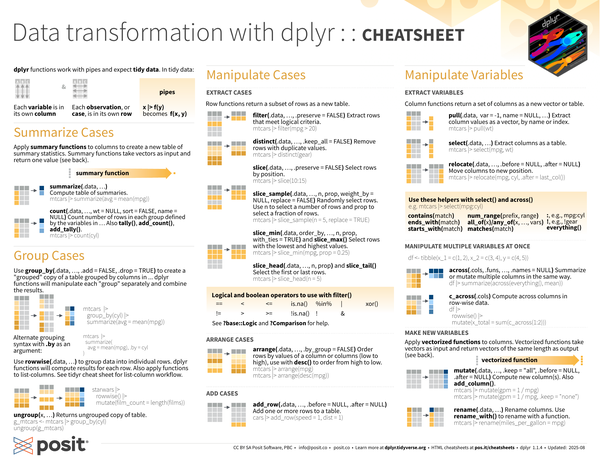
dplyr functions work with pipes and expect tidy data. In tidy data:
- Each variable is in its own column
- Each observation, or case, is in its own row
- pipes
x |> f(y)becomesf(x,y)
| |
| |
Summarize Cases
Apply summary functions to columns to create a new table of summary statistics. Summary functions take vectors as input and return one value back (see Summary Functions).
summarize(.data, ...): Compute table of summaries.1mtcars |> summarize(avg = mean(mpg))count(.data, ..., wt = NULL, sort = FLASE, name = NULL): Count number of rows in each group defined by the variables in.... Alsotally(),add_count(), andadd_tally().1mtcars |> count(cyl)
Group Cases
Use
group_by(.data, ..., .add = FALSE, .drop = TRUE)to created a “grouped” copy of a table grouped by columns in.... dplyr functions will manipulate each “group” separately and combine the results.1 2 3mtcars |> group_by(cyl) |> summarize(avg = mean(mpg))Alternate grouping syntax with
.byas an argument:1 2mtcars |> summarize(avg = mean(mpg), .by = cyl)Use
rowwise(.data, ...)to group data into individual rows. dplyr functions will compute results for each row. Also apply functions to list-columns. See tidyr cheatsheet for list-column workflow.1 2 3starwars |> rowwise() |> mutate(film_count = length(films))ungroup(x, ...): Returns ungrouped copy of table.1 2 3 4#| include: false g_mtcars <- mtcars |> group_by(cyl) ungroup(g_mtcars)
Manipulate Cases
Extract Cases
Row functions return a subset of rows as a new table.
filter(.data, ..., .preserve = FALSE): Extract rows that meet logical criteria.1mtcars |> filter(mpg > 20)distinct(.data, ..., .keep_all = FALSE): Remove rows with duplicate values.1mtcars |> distinct(gear)slice(.data, ...,, .preserve = FALSE): Select rows by position.1mtcars |> slice(10:15)slice_sample(.data, ..., n, prop, weight_by = NULL, replace = FALSE): Randomly select rows. Usento select a number of rows andpropto select a fraction of rows.1mtcars |> slice_sample(n = 5, replace = TRUE)slice_min(.data, order_by, ..., n, prop, with_ties = TRUE)andslice_max(): Select rows with the lowest and highest values.1mtcars |> slice_min(mpg, prop = 0.25)slice_head(.data, ..., n, prop)andslice_tail(): Select the first or last rows.1mtcars |> slice_head(n = 5)
Logical and boolean operations to use with filter()
==<<=is.na()%in%|xor()!=>>=!is.na()!&- See
?base::Logicand?Comparisonfor help.
Arrange cases
arrange(.data, ..., .by_group = FALSE): Order rows by values of a column or columns (low to high), use withdesc()to order from high to low.1 2mtcars |> arrange(mpg) mtcars |> arrange(desc(mpg))
Add Cases
add_row(.data, ..., .before = NULL, .after = NULL): Add one or more rows to a table.1cars |> add_row(speed = 1, dist = 1)
Manipulate Variables
Extract Variables
Column functions return a set of columns as a new vector or table.
pull(.data, var = -1, name = NULL, ...): Extract column values as a vector, by name or index.1mtcars |> pull(wt)select(.data, ...): Extract columns as a table.1mtcars |> select(mpg, wt)relocate(.data, ..., .before = NULL, .after = NULL): Move columns to new position.1mtcars |> relocate(mpg, cyl, after = last_col())
Use these helpers with select() and across()
| |
contains(match)num_range(prefix, range):, e.g.,mpg:cylends_with(match)all_of(x)orany_of(x, ..., vars)!, e.g.,!gearstarts_with(match)matches(match)everything()
Manipulate Multiple Variables at Once
| |
across(.cols, .fun, ..., .name = NULL): summarize or mutate multiple columns in the same way.1df |> summarize(across(everything(), mean))c_across(.cols): Compute across columns in row-wise data.1 2 3df |> rowwise() |> mutate(x_total = sum(c_across(1:2)))
Make New Variables
Apply vectorized functions to columns. Vectorized functions take vectors as input and return vectors of the same length as output (see Vectorized Functions).
mutate(.data, ..., .keep = "all", .before = NULL, .after = NULL): Compute new column(s). Alsoadd_column().1 2mtcars |> mutate(gpm = 1 / mpg) mtcars |> mutate(mtcars, gpm = 1 / mpg, .keep = "none")rename(.data, ...): Rename columns. Userename_with()to rename with a function.1mtcars |> rename(miles_per_gallon = mpg)
Vectorized Functions
To Use with mutate()
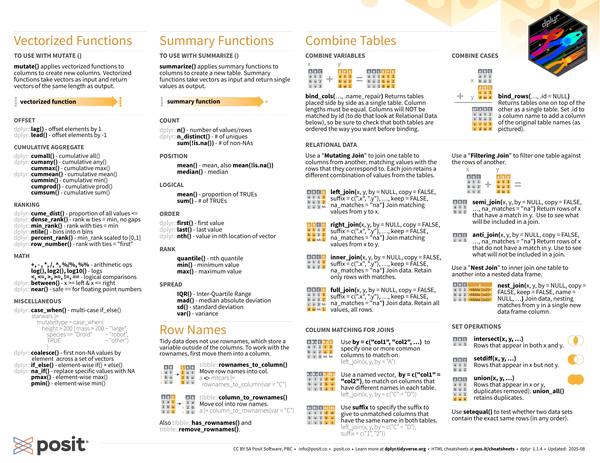
mutate() applies vectorized functions to columns to create new columns.
Vectorized functions take vectors as input and return vectors of the same length as output.
Offset
dplyr::lag(): offset elements by 1dplyr::lead(): offset elements by -1
Cumulative Aggregate
dplyr::cumall(): cumulativeall()dply::cumany(): cumulativeany()cummax(): cumulativemax()dplyr::cummean(): cumulativemean()cummin(): cumulativemin()cumprod(): cumulativeprod()cumsum(): cumulativesum()
Ranking
dplyr::cume_dist(): proportion of all values <=dplyr::dense_rank(): rank with ties = min, no gapsdplyr::min_rank(): rank with ties = mindplyr::ntile(): bins into n binsdplyr::percent_rank():min_rank()scaled to [0,1]dplyr::row_number(): rank with ties = “first”
Math
+,-,/,^,%/%,%%: arithmetic opslog(),log2(),log10(): logs<,<=,>,>=,!=,==: logical comparisonsdplyr::between(): x >= left & x <= rightdplyr::near(): safe==for floating point numbers
Miscellaneous
dplyr::case_when(): multi-caseif_else()1 2 3 4 5 6starwars |> mutate(type = case_when( height > 200 | mass > 200 ~ "large", species == "Droid" ~ "robot", TRUE ~ "other" ))dplyr::coalesce(): first non-NA values by element across a set of vectorsdplyr::if_else(): element-wise if() + else()dplyr::na_if(): replace specific values with NApmax(): element-wise max()pmin(): element-wise min()
Summary Functions
To Use with summarize()
summarize() applies summary functions to columns to create a new table.
Summary functions take vectors as input and return single values as output.
Count
dplyr::n(): number of values/rowsdplyr::n_distinct(): # of uniquessum(!is.na()): # of non-NAs
Position
mean(): mean, alsomean(!is.na())median(): median
Logical
mean(): proportion of TRUEssum(): # of TRUEs
Order
dplyr::first(): first valuedplyr::last(): last valuedplyr::nth(): value in the nth location of vector
Rank
quantile(): nth quantilemin(): minimum valuemax(): maximum value
Spread
IQR(): Inter-Quartile Rangemad(): median absolute deviationsd(): standard deviationvar(): variance
Row Names
Tidy data does not use rownames, which store a variable outside of the columns. To work with the rownames, first move them into a column.
tibble::rownames_to_column(): Move row names into col.1a <- rownames_to_column(mtcars, var = "C")tibble::columns_to_rownames(): Move col into row names.1column_to_rownames(a, var = "C")Also
tibble::has_rownames()andtibble::remove_rownames().
Combine Tables
| |
Combine Variables
bind_cols(..., .name_repair): Returns tables placed side by side as a single table. Column lengths must be equal. Columns will NOT be matched by id (to do that look at Relational Data below), so be sure to check that both tables are ordered the way you want before binding.
Combine Cases
bind_rows(..., .id = NULL): Returns tables one on top of the other as a single table. Set.idto a column name to add a column of the original table names.
Relational Data
Use a “Mutating Join” to join one table to columns from another, matching values with the rows that the correspond to. Each join retains a different combination of values from the tables.
left_join(x, y, by = NULL, copy = FALSE, suffix = c(".x", ".y"), ..., keep = FALSE, na_matches = "na"): Join matching values fromytox.right_join(x, y, by = NULL, copy = FALSE, suffix = c(".x", ".y"), ..., keep = FALSE, na_matches = "na"): Join matching values fromxtoy.inner_join(x, y, by = NULL, copy = FALSE, suffix = c(".x", ".y"), ..., keep = FALSE, na_matches = "na"): Join data. retain only rows with matches.full_join(x, y, by = NULL, copy = FALSE, suffix = c(".x", ".y"), ..., keep = FALSE, na_matches = "na"): Join data. Retain all values, all rows.
Use a “Filtering Join” to filter one table against the rows of another.
semi_join(x, y, by = NULL, copy = FALSE, ..., na_matches = "na"): Return rows ofxthat have a match iny. Use to see what will be included in a join.anti_join(x, y, by = NULL, copy = FALSE, ..., na_matches = "na"): Return rows ofxthat do not have a match iny. Use to see what will not be included in a join.
Use a “Nest Join” to inner join one table to another into a nested data frame.
nest_join(x, y, by = NULL, copy = FALSE, keep = FALSE, name = NULL, ...): Join data, nesting matches fromyin a single new data frame column.
Column Matching for Joins
Use
by = join_by(col1, col2, …)to specify one or more common columns to match on.1 2left_join(x, y, by = join_by(A)) left_join(x, y, by = join_by(A, B))Use a logical statement,
by = join_by(col1 == col2), to match on columns that have different names in each table.1left_join(x, y, by = join_by(C == D))Use
suffixto specify the suffix to give to unmatched columns that have the same name in both tables.1left_join(x, y, by = join_by(C == D), suffix = c("1", "2"))
Set Operations
intersect(x, y, ...): Rows that appear in bothxandy.setdiff(x, y, ...): Rows that appear inxbut noty.union(x, y, ...): Rows that appear in x or y, duplicates removed.union_all()retains duplicates.- Use
setequal()to test whether two data sets contain the exact same rows (in any order).
