

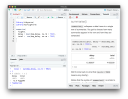
This blog post is part of a series on new features in RStudio 1.3, currently available as a preview release .
We’re excited to announce that RStudio v1.3 will gain a newly-minted pane: the Tutorial pane, used to host tutorials powered by the learnr package.
The learnr package makes it easy to turn any R Markdown document into an interactive tutorial. Here are some example tutorials from the learnr package, hosted on shinyapps.io :
Summarizing Data

Filtering Data

A learnr tutorial can include any of the following:
- Narrative, figures, illustrations and equations,
- Code exercises (R code chunks that users can edit and execute),
- Quiz questions,
- Videos,
- Interactive Shiny components.
With the Tutorial pane, it is now possible to work through a learnr tutorial directly from the comfort of the RStudio IDE. You can use the RStudio IDE to learn, reflect, and tinker as you work through your running tutorial.

Browsing Tutorials#
RStudio will automatically index and display the tutorials provided by the installed R packages in your R library paths:

You can use this list to browse and run tutorials at your convenience.
Authoring Tutorials#
The learnr package bundles a selection of tutorials that will introduce users to R, RStudio and the Tidyverse , but we hope the R community at large will find this a useful medium for creating and sharing their own R tutorials. If you’re interesting in authoring your own learnr tutorials, please see the Publishing article on the learnr website .
Try it Out!#
The Tutorial pane is available in the latest iteration of the RStudio v1.3 preview release. You can download the latest preview release here:
We’d also like to take this time to highlight a small selection of R packages developed and shared by members of the R community that provide their own learnr tutorials:
-
vegawidget can be used to render charts specified using the Vega visualization grammar, and includes a learnr tutorial exploring how the package can be used;
-
sortable includes a tutorial showing how sortable widgets can be included in your own learnr tutorials;
-
sur includes a tutorial that (quite comprehensively!) explores the manipulation of R data frames, including how missing data can be handled.
If you’d like to try out the tutorials bundled in these packages, you can install the packages from CRAN with:
install.packages(c("vegawidget", "sortable", "sur"))
and their associated tutorials will automatically become available in the Tutorial pane.
Questions? Comments? Please share your feedback with us on the RStudio community forums .


